More speed, more power: ADO A20 vs Himo Z20 – comparison review

ADO A20 vs Xiaomi HIMO Z20 - 20" folding e-bike hands-on comparison review, test and manual
More Power, More Speed:
Is the ADO A20+ the better choice compared to HIMO Z20?

There’s one complaint I constantly hear about Himo Z20 e-bike: It is too slow. Even tough HIMO Z20 is a very reliable e-bike with a great design a bit more power would be beneficial to go faster than 25 kph. Despite there is an option to unlock the speed of other bikes, like Fiido D4s, no one has managed to do so with HIMO Z20 (this refers to a software unlock, you can change the controller and other parts to make it faster). So I got myself the ADO A20 which not only offers 350W motor power, it also has the option to unlock the speed to go up to 35 km/h.

Naming
ADO A20 was renamed after an adjustment to ADO A20+. ADO now uses their full brand name: A Dece Oasis. There is also a connection between ADO and Himo as both are sold on the same platforms – more on this in theprice comparison section.

Here’s my comparison review of the 20″ folding e-bikes: ADO A20 vs HIMO Z20 also including the specs of Fiido D4s and Fiido D11; In my post I want to:

  • Compare the main specs
  • Review the bikes and to point out differences as well as problems and issues
  • Give you shopping tips (coupon codes & customs info)

Video Comparison Review

My Youtube Comparison Video

Intro –
Why 20″ folding e-bikes?

I got myself a compact-to-store e-bike for my daily commute to work and selected HIMO Z20. Important for me was the removable battery, so you can take it with you for charging. I think that 20″ wheels is the ideal compromise: the bike is small enough to store and the wheels big enough to provide a smooth ride. The larger wheels provide a comfortable driving experience for longer distances, compared to the 16″models of which many were released earlier. As mentioned the ADO A20 is very comparable by the specs but it also got a lot of interesting details that seem to be interesting improvements over Himo Z20.

Fiido offers a  more affordable 20″ folding e-bike – the Fiido D4s. Main difference is that the battery is built-in and therefore I excluded it from my personal selection. However I want to include it in this review with remarks, as it is a bit cheaper and if the removable battery is not an issue for you – maybe an interesting choice. I also own a Fiido D11, which is great for the city and paved streets, but it gets rough on gravel roads. So ADO A20+ and HIMO Z20 are better allrounder bikes.

ADO A20 vs Himo Z20 vs Fiido D11
Main Specs compared:

NameADO A20+Himo Z20Himo Z20 MAXENGWE C20ADO Air 20ADO Air 20sFiido D11Fiido D21Fiido D4s
max. Speed:
Unlocked:
25 km/h (15mph)
35 km/h (21mph)
25 km/h (15mph)
not available
25 km/h (15mph)
not available
25 km/h (15mph)
?
25 km/h (15mph)25 km/h (15mph)25 km/h (15mph)
28 km/h (17mph)
25 km/h (15mph)
???
25 km/h (15mph)
30 km/h (18mph)
Range:
(assisted mode)
80 km (50mi)**80 km (50mi)**80 km (50mi)**80 km (50mi)**100 km (62mi)**100 km (62mi)**80-100 km (62mi)**80-100 km (62mi)**80 km (50mi)**
Weight:21,2 kg (46,7 lbs)21,9 kg (48.2 lbs)22 kg (49 lbs)24 kg (52.9 lbs)16 kg (37 lbs)16 kg (37 lbs)17,5 kg (38.5 lbs)17,5 kg (38.5 lbs)18,5 kg (41 lbs)
Dimensions:
(unfolded)
155 x 53 x 110 cm147 × 61 × 109,5 cm147 × 55 × 109,5 cm160 × 61 × 110 cm156 × 57 × 110 cm156 × 57 × 110 cm148 × 57 × 110 cm148 × 57 × 110 cm150 × ? × 108 cm
Dimensions:
(folded)
90 x 43 x 70 cm86 × 45 × 74 cm86 × 40 × 74 cm76 × ? × 66 cm68 x 52 x 86 cm68 x 52 x 86 cm59 x 40 x 84 cm59 x 40 x 84 cm85 x ? x 64 cm
Folding Pedals:YesYesYes
Aluminum alloy
YesYesYesNo
Aluminum alloy
NoNo
Payload:120 kg (265 lbs)100 kg (220 lbs)100 kg (220 lbs)150 kg (330 lbs)120 kg (265 lbs)120 kg (265 lbs)120 kg (265 lbs)120 kg (265 lbs)120 kg (265 lbs)
Seat Pole:adjustable
in height
adjustable
in height
adjustable
in height
adjustable
in height
adjustable
in height
adjustable
in height
adjustable
in height
adjustable
in height
adjustable
in height
Steering Rod:adjustable
in height
NOT adjustable
in height
NOT adjustable
in height
adjustable
in height
adjustable
in height
adjustable
in height
NOT adjustable
in height
NOT adjustable
in height
adjustable
in height
Battery:
(Capacity)
10.4 Ah10.4 Ah10.4 Ah10.4 Ah
19.2 AH (Pro version)
9.6 Ah9.6 Ah11.6 Ah11.6 Ah10 Ah
Removeable Battery:YesYesYesYesYesYesYesYesNo
Battery Lock:YesYesYesYesNoNoNoNoNo
Motor Power:250W
(unlocked 350W)
250W250W250W250W
350W int. version
250W
350W int. version
250W250W250W
Sensor:G Drive (improved speed sensor)Hall SensorHall SensorSensorTorque SensorTorque SensorSpeed SensorTorque SensorSpeed Sensor
Throttle:twisttwistNOleverleverleverleverlevertwist
Powers from standing still:YesNoNoYesYesYesYesYesYes
Cruise Control:Yes*NoNo???YesYesNo
Tires:20″ air tube
(20 x 1.95)
20″ air tube
(20 x 2.12)
20″ air tube
(20 x 2.12)
20″ air tube
(20 x 2.3)
20″ air tube
(20 x 1.75)
20″ air tube
(20 x 1.75)
20″ air tube
(20 x 1.75)
20″ air tube
(20 x 1.75)
20″ air tube
Suspension:
(front/rear)
Yes / YesNo/NoNo/NoYes / NoNo/NoYes / NoNo/NoNo/NoNo/No
Brake:
(front/rear)
mechanical (disc)mechanical (disc)mechanical (disc)mechanical (disc)mechanical (disc)mechanical (disc)mechanical (disc)mechanical (disc)mechanical (disc)
Transmission:7-speed (Shimano)6-speed (Shimano)6-speed (Shimano)7-speed (Shimano)single speedsingle speed7-speed (Shimano)7-speed (Shimano)6-speed (Shimano)
Display:YesYesYesYesYesYesYesYesYes
Fenders:includedincludedincludednot includedincludedincludedincludedincludednot included
Features:USB Phone Charger
CE certified
Air pump in seat poleAir pump in seat pole
EU compliant
Carbon belt (instead of chain)Carbon belt (instead of chain)
Colors:black, whitegrey, whitegrey, whitegrey, blackblue, grey, ivorygreybluegreyblack, white
My Hands-on
Comparison Review:
A20 vs Z20Z20 vs A20
Z20 vs D11
Z20 vs A20
Z20 vs D11
coming sooncoming sooncoming soonD11 vs Z20
Price:
799 EUR
799 EUR819 EUR699 EUR
Coupon Code: 6NCLURKG
1349 EUR1499 EUR899 EUR1099 EUR 599 EUR

**estimated company data – based on my experience there is a lot of influence on the range: driver weight, flat or hilly road, constant drive or stop&go traffic, temperature,…
Range in full electric mode is about 60%.
Hard to get a fair test result to compare.

! There is the option to activate a cruise control in ADO A20, although I haven’t managed to make it work so far.

Hands-on Review –
ADO A20 vs Himo Z20

I picked these two bikes to compare as there are many similarities: 20″ folding e-bike with removeable battery. That is an important item for me so I excluded Fiido D4s. Great to use on roads and unpaved tracks while Fiido D11 is just good on well paved roads. So in the first section I want to point out the major differences between Himo Z20 and ADO A20, then take a look at similarities and minor differences (which still might be very relevant for your situation) and then take a look at the settings and driving modes:

What’s different?

Speed & Motor

Himo Z20 offers a 250W motor that provides a top speed of 25 km/h – on paper. Actually I achieve a top speed of 23-24km/h. I tried my best but haven’t found a solution how to unlock the speed. Don’t bother watching all the HIMO Z20 seed unlock videos on YouTube – they are misleading! In these videos they change the diameter of the wheel. This results in a higher speed displayed on the speedometer but the bike is not going faster. I tried with a second speedometer.
There is of course the option to make it faster by changing controller and motor, but you need to change the hardware.

ADO A20 also offers a 250W motor and a top speed of 25 km/h. That is important as these are legal requirements in many countries. Although it can be unlocked within the settings on the controller. Then ADO A20 offers 350W and a top speed of 35 km/h. That is even faster than Fiido D4s that can be unlocked to go 30 km/h, Fiido D11 can be unlocked to 28 km/h.

Design & Frame

Xiaomi HIMO Z20 review - Frame & Design - BMX design, Cables run inside the frame, ports are covered
HIMO Z20 – Frame & Design – BMX design, Cables run inside the frame, ports are covered

I think that HIMO Z20 has a bit more appealing design. It looks like a regular BMX bike and less like a chunky e-bike. I also like the fact that the cables run inside the frame and are not visible. Welding is quite ok and all ports are nicely covered.

ADO A20 - 350W 35 km/h 20" folding e-bike - - Frame & Design - Very useful handle grip
ADO A20 – Frame & Design – Very useful handle grip

On the other hand ADO A20 has a more practical design with a lot of design details that are very convenient. I really like the handle-grip included in the frame near the center of gravity of the bike. Great when you need to move it around in your flat, office or public transport. Welding is very similar to Himo Z20, I don’t like that ports are not covered. But there are smaller more design details I appreciate:

ADO A20 vs Xiaomi HIMO Z20 e-bike review - Stand when folded and unfolded
ADO A20 vs HIMO Z20 – Stand when folded and unfolded

When folded the weight of ADO A20 rests on a metal frame and is very stabile. While HIMO Z20 rests on the cover of the front sprocket and the seat pole and easily tips over to the side. The stand of ADO 20 is placed further to the rear so it is not touching the pedals, on my HIMO Z20 they easily touch and scratch both pedal and stand.

Weight

Important notice: The weight of ADO A20 is often stated wrongly! I tested on a scale and can confirm, the weight of ADO A20 is 21.0 kg (46.3 lbs) including battery and with fenders mounted. The weight of Himo Z20 is 21,85 kg (48.2 lbs) including battery and with the plastic fenders mounted. (Z20 comes with plastic and aluminum fenders, you can shoode which one you want to mount). So even tough ADO A20 has a suspension, which usually increases weight, it is lighter than Himo Z20. I assue that’s because the frame is heavier on Z20.

ADO A20 vs HIMO Z20 - Weight Comparison (incl. battery & fenders)
ADO A20 vs HIMO Z20 – Weight (incl. battery & fenders)

Display

ADO A20 vs Himo Z20 - Display, Drive Mode, Settings, Manual
ADO A20 vs Himo Z20 – Display

ADO A20: The display holds three buttons to power on the bike and to select the different driving modes. These buttons are also used to change settings. (More on that in the driving mode section). Next to the display are two further buttons for the front LED light and the electric horn. Current speed, driving mode, trip/total mileage and battery status are displayed.

Himo Z20: You can find 4 buttons on the display: the power button and the switch trip/total mileage on the bottom and +/- buttons to select the driving mode. Long pressing the plus button turns on the front LED light. There is no electric horn, but a regular bell on Z20. Similar to ADO A20 current speed, mode, trip or total mileage and battery status are displayed.

The display of ADO A20 is brighter & larger and therefore way better to read, especially in direct sunlight.

Phone Charger

ADO A20 20" folding e-bike review - USB port for phone charger
ADO A20 – USB port for phone charger

A super convenient feature of ADO A20 is the USB port on the handle bar. A phone holder is also included in the standard package so you can not only mount your phone, you can also charge it while riding. Great feature when you want to use maps for example.

Suspension & shock absorbers

ADO A20 - 20" folding e-bike review - Suspension & Shock Absorber
ADO A20 – 20″ folding e-bike review – Suspension & Shock Absorber

HIMO Z20 doesn’t offer any form of suspension or shock absorbers. On the other side ADO A20 offers a suspension on the front wheel with a shock absorbing fork and below the saddle there is a damper as well.

Battery

ADO A20 vs HIMO Z20 - Battery
ADO A20 vs HIMO Z20 – Battery

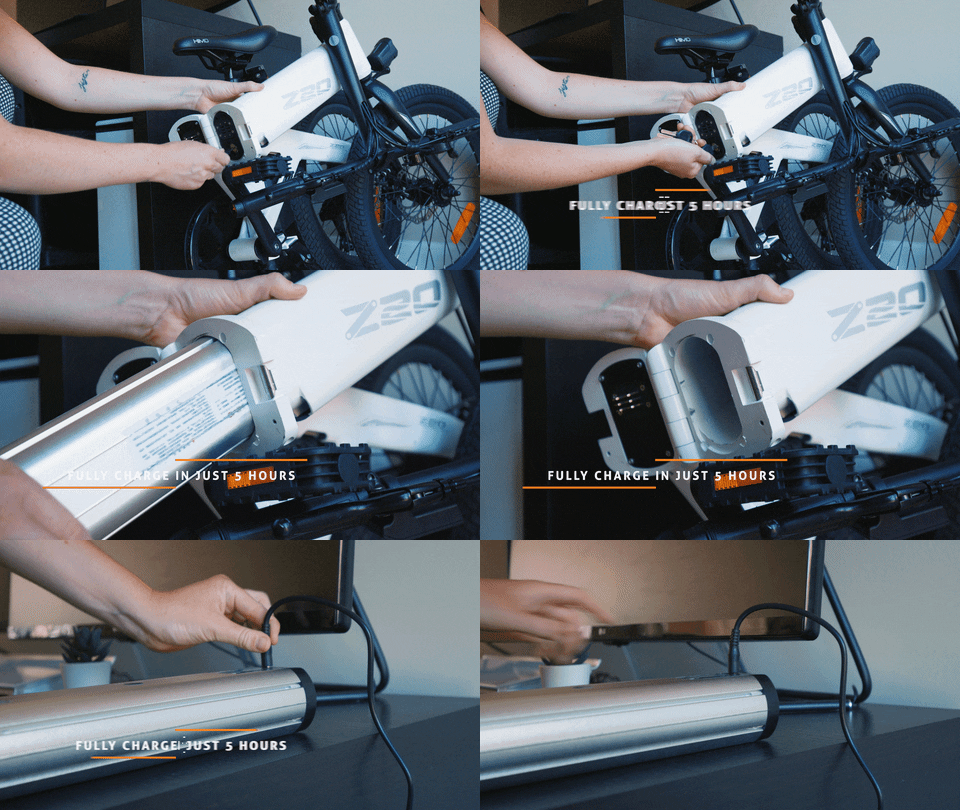
The battery of both e-bikes have a capacity of about 10 Ah and are stored inside the frame of the bike. Both batteries can be locked, the lock is located on the battery. The lock of HIMO Z20 is on the front when opening the frame, the lock of ADO A20 is accessed from the bottom. This has a special reason as you need the key to turn it on. There are 3 lock positions: released, lock & turn off as well as lock and turn on. Guess it’s a matter of taste: On the one hand it is more secure that you need the key to activate ADO A20, on the other side you always have to have the key with you.
Both batteries can be removed for charging – that’s convenient if you lock your bike and just take the battery with you for charging. Or you can charge it when the battery is placed inside in the bike.

ADO A20 vs HIMO Z20 - test, unboxing, review - Charger (EU Plug version)
ADO A20 vs HIMO Z20 – Charger (EU Plug version)

The charger is of course included, be aware that the charger for Himo Z20 is very bulky in case you need to take it with you. Don’t worry about the correct power plug, it connects to the charger using a 3-pole cable so you can exchange it inexpensively. The charger of ADO A20 is more compact to take it with you and is using a 2-pol cable.

Similarities and minor differences:

Tires, Wheels & Brakes

ADO A20 vs HIMO Z20 - Comparison Review - Brakes
ADO A20 vs HIMO Z20 – Brakes

A very visible difference are the wheels. While HIMO Z20 is using a classic spoke design, found on most bicycles, ADO A20 wheels featur ae six-axis spoke design which to me is very appealing.
ADO A20 and HIMO Z20 use 160mm diameter mechanical disc brakes on front and rear wheel. The brakes were quite well adjusted out of the box, but I do recommend fine tuning them before your first ride. You do so with an Allen key, like on any other bike. With ADO A20 the tool was already included.
Both bikes offer 20″ air tube tires, to be precise ADO A20 tires measures 20 x 1.95 compared to HIMO Z20 20 x 2.125. The profile and the width of the tires are perfect to go on unpaved roads.

Lights

ADO A20 vs Xiaomi HIMO Z20 - comparison review - LED Lights
ADO A20 vs HIMO Z20 – LED Lights

The LED headlights on both bikes are connected to the bikes battery and can be turned on and off via a button next to the display. While the headlight of Himo Z20 consists of one LED the headlight of ADO A20 is super bright using four LEDs.
Unfortunately there is no rear light included with ADO A20, just a reflector is mounted on the seat pole. HIMO Z20 offers a combination of rear light and reflector which is not connected to the bikes battery and therefore battery powered. One reason why it might not be connected is the removable seat pole of Himo Z20 that can be used as an air pump. With ADO A20 a small air pump as accessory is included in the standard package.

I replaced both rear lights and can recommend using Xlite 100. It has automatic movement detection, so it turns off when you don’t move. Further it detects change in movement, so when you brake it flashes brighter. And with a light sensor it automatically turns on/off according to the daylight. It is charged via USB port.

Throttle

ADO A20 vs HIMO Z20 - Comparison review - Throttle Control
ADO A20 vs HIMO Z20 – Throttle Control

Both bikes are controlled by a throttle integrated into the handle grip that needs to be twisted, similar to a motorcycle. Yet there is a slight difference, while you need to twist the full handle grip on HIMO Z20, only a section of the handle on ADO A20 needs to be twisted. I find this way more convenient as it gives you more relaxed hand position during the ride. (also compare picture below)
Himo Z20 does not accelerate from standing still, the bike has to be in motion. But only a slight push by your foot is needed and you can accelerate fully electric. ADO A20 can accelerate from standing still, but you can configure that in the settings as you prefer.
Even more convenient: ADO A20 is offering cruise control so you do not have to hold the throttle constantly. HIMO Z20 does not have this option.

Gears & Gear Shift

ADO A20 vs HIMO Z20 - Shimano 7-speed Gear Shift
ADO A20 vs HIMO Z20 – Gear Shift

Both bikes offer a Shimano gear shift and the shifters look almost identical with a lever to change to a higher gear and a button to change to a lower gear. There is a difference as Himo Z20 offers a 6-speed gearshift while ADO A20 offers a 7-speed gearshift with a respective number of sprockets on the rear wheel. The sprocket on the front is covered on the inside and on the outside on both bikes. That’s important so your trousers don’t get ripped on your way to the office. Gearshift on both bikes was well adjusted out-of-the-box I didn’t have to finetune them.

Pedals

ADO A20 vs HIMO Z20 - comparison review - flip-up Pedals
ADO A20 vs HIMO Z20 – flip-up Pedals

The pedals of both ADO A20 and Himo Z20 are made of plastic but provide a good grip. They can be folded for an even more compact storage size. As these are standard bike parts they can be easily replaced if you want fixed metal pedals and don’t need the option for storage. A reflector is integrated (which is legally required in some countries).

Size & Weight

ADO A20 vs Xiaomi Himo Z20 - Dimension (folded)
ADO A20 vs Himo Z20 – Dimension (folded)

When unfolded they are about the same size and about 110 cm long. HIMO Z20 is 147cm tall and that refers to the steering rod which is not adjustable in height. With ADO A20 you can adjust the height and this is of course a great option to find a comfortable driving position.

As you can see when folded they also have a similar size, but when it comes to storage every cm / inch counts, therefore in detail:
ADO A20 is 90 cm long, 43cm wide and 70 cm tall. HIMO Z20 is 86 cm long, 45 cm wide and 74cm high.

There is one design part I want to highlight: When HIMO Z20 is folded it sits on the cover of the front sprocket and the seat pole. Something I dislike a lot since I’m afraid these parts can be damaged when the bike is stored. ADO A20 features this metal frame where the weight of the bike rests. This also secures the bike from falling over to the side! Little detail, but very important!

I believe the stated weight of ADO A20 is wrong. In the specs it says 28 kg but it feels lighter than the 21.4 kg Himo Z20. I need to get a proper scale to check again.

ADO A20 vs Himo Z20 –
Driving Modes

Manual Mode

First of all you can go fully manual (you don’t even have to power them on) and they work just like regular bikes. However due to the battery they are a bit heavier than regular bikes and therefore require a bit more effort when pedaling. Don’t worry it’s not that much of an exercise but I won’t recommend them if you want to pedal without assistance most of them time. You can remove the battery on both of them to make it lighter if you go fully manual.

The driving modes on ADO A20 and Himo Z20 are similar but very different to Fiido e-bikes. With Fiido you basically set the level of assistance. To me that’s a bit misleading. I have the feeling that with Fiido the motor is not assisting your pedaling, the motor is rather activated to full throttle when you start pedaling.

ADO A20 – Driving Modes

There are 3 different driving modes on ADO A20. And the great thing about it, which I haven’t seen on similar e-bikes, you can adjust them within the settings.

  • Mode 1 – is the pedal assist mode. When you start pedaling the motor kicks in and supports your ride. As mentioned with the controller you can adjust wen the motor should start its support. The pedal assist mode works to a speed up to 18 km/h. In this mode the throttle is disabled, but you can also adjust that within the settings (more on that at the end of the article)
  • Mode 2 – is the first full electric mode. When turning the throttle the bike accelerates up to 25 km/h. You can adjust within the settings if zero start is enabled or not. Zero starts means being able to power the bike when standing still.
  • Mode 3 – in this mode you can unlock the speed of ADO A20 up to a top speed of 35 km/h. More on that at the bottom of the article.

NEWS:
There is a new controller offered for ADO A20, which allows you to go faster in pedal assist mode. The new controller allows you 2 new options for the 3 modes, you can either select:
– 3 full electric modes (15 / 20 / 25 kph)
– or 2 pedal assist modes (18 / 25 kph) and a full electric mode with 35 kph.

You can order the controller in a set with rear light and reflector for the wheels (which is not included with the bike) in their Aliexpress Store. Be sure to get the right one as there are new controllers also for ADO A16 and ADO A20F. Check out their website: www.adoebike.com
They also released a YouTube video how to change the controller which should be easy to do.

Himo Z20 – Driving Modes

  • ECO – is the pedal assist mode. When you start pedaling at about 5 km/h you feel the motor kicking in and it makes pedaling seemingly easier. It feels like the motor is assisting your pedaling in relation to the speed you want to go by pedaling. The assistance mode works up to 18 km/h but you can always go faster by pedaling. However at this speed the effort to go even faster is lower than from standing still. In this mode the throttle is not activated.
  • MID – is a full electric mode. When you twist the throttle the bike accelerates up to about 18 km/h. You can always go faster by pedaling the bike is not slowing you down.
  • HIGH – is the second full electric mode and the bike accelerates up to 24 km/h. (As mentioned I didn’t get 25 km/h I think the limit is 15 mph). Again you can always go faster by pedaling, the bike is not slowing you down or braking.

Usually I go in High Mode and pedal as well to go faster. I only switch to Eco mode when I want to have the feeling of riding a bicycle with the benefit of being less exhausting, so I don’t arrive sweaty in the office.

ADO A20 vs Himo Z20 –
Issues and Problems

HIMO Z20 Problems: The bike is not hitting 25 km/h and maximum speed is 23-24 km/h. I think that is the case because to speed is set to 15 mph. It’s just 1-2 km/h but still bothersome. The plastic pedals on Himo Z20 slightly yield and don’t provide the best grip. If you go full electric most of the time you don’t need to worry. Since I often like to pedal to go faster I replaced them with different folding pedals. If you don’t need folding ones for storage reasons you can also go for aluminum pedals.

ADO A20 Problems: Similar to Himo Z20 the pedals are not the best and I replaced them. There is a bit of a rattle noise from the battery as it is not fully tight within the battery compartment, but that is an easy fix you just need to apply some adhesive tape or felt pads on the battery and this issue is solved.

ADO A20 – Replacement Parts

Need replacement parts for ADO A20 e-bike? No problem, great to see ADO lists all parts on their ADO bike store on Aliexpress or on their website: adoebike.com

ADO A20 vs Himo Z20 – Short summary

I have to say I was for more impressed when I unpacked ADO A20 than I expected. There are so many details I instantly loved and instantly missed on the HIMO Z20

ADO A20 compared to Himo Z20:

Higher top speed, more power

Suspension on front and back

very bright and large display

Phone Charger

super bright headlight

Frame (handle grip & stand)

folding size (similar to HIMO Z20)

missing rear light (would have replaced it anyway)

key needs to be inserted while driving

More Infos?

Here’s my hands on comparison of Himo Z20 and Fiido D11 and below a video comparison of Himo Z20 and its predecessor Himo C20. Of course a ADO A20 vs HIMO Z20 video will follow soon – stay tuned!

Want to talk to other users? Join the Facebook groups:

  ADO e-bike Facebook Group

  Himo e-bike Facebook Group

  Fiido e-bike Facebook Group

Buyer Guide –
Retailer & Price Comparison

  • Official ADO Website: www.adoebike.com
    Here you have the benefit to buy directly from the manufacturer
    They offer 48h free shipping options across EU & UK
    It seems ADO A20 was removed from the store in favor of ADO A20 Air products:
  • official HIMO Website: www.himobikes.com
    This site offers both ADO & HIMO bikes and is their official store.
    Both models ADO A20 and HIMO Z20 can be found here.
  • Geekbuying
    I got my ADO A20 from Geekbuying
    check the website for coupon codes, sometimes they are cheaper than on the official site!
  • Amazon
    ADO operates their own Amazon Store “A Dece Oasis-Store
    where you can find all their current products and having the Amazon Prime shipping benefits:
  • Aliexpress
    several reseller offer ADO and HIMO on Aliexpress
    check the different warehouse options!

ADO A20 – How to unlock speed and other controller settings

To enter the settings mode you need to turn on your bike and press the + and – button for 3 seconds. Then you see the different options (indicated with P) and can cange the settings as follows:

  • P01: Display Brightness – 1 is darkest, 3 is brightest setting
  • P02: Metric system –  0 is KM, 1 is Mile
  • P03: Voltage – there are options for 24V, 36V & 48V. That’s because the controller is used on several bikes.
  • P04: Bike Auto Shutting-down time – it means if you do not operate the bike computer or use the e-bike within the minutes range from 1 to 60 minutes, the bike computer will shut down automatically.
  • P05: PAS (pedal assist) preference – 0 only shows 1-3 levels; 1 shows 1-5 levels. ( Just showing PAS level number are different, but top and lowest level power is the same, such as 3 = 5 in different working modes).
  • P06: Wheel/rim diameter in inch – Options are 20/22/26/28 (if 20 inch rim, setting number will be 22inch)
  • P07: Speed Monitor setting, this technical setting is no use for customer but only for engineer setting, please do not modify or change the setting. Range: 1-100;
  • P08: Speed limited setting – You can set between 1 and 100 km/h. If set to 100 it means there is no limited for speed. The speed limited setting is controlled by motor and controller. You can only set the bike computer speed limit with the range of limit motor and controller. If you set it to 50 the top speed will be 35 km/h since that is the max speed for this bike with this controller and motor.
  • P09: Zero boost or Non Zero boost – 0 means zero boost, you can apply power from standing still. 1 means non zero boost, you have to be in motion to apply power from the motor.
  • P10: Driving modes – 0 – PAS only, the throttle is not working. 1—throttle only, PAS is not working. 2—both throttle and PAS are working.
  • P11: PAS sensitivity setting – Range: 1-24
  • P12: PAS strength setting – Range: 1-5
  • P13: PAS magnetic sensor setting – Range: 5/ 8/12
  • P14: Controller Max current limit setting – Range: 1-20A
  • P15: Controller Low voltage setting. Range: N/A, need to check with controller technical data sheet.
  • P16: ODO – total odometer clearance setting. Press for 5 seconds in setting mode, you can change and clear the current total odometer to Zero.
  • P17: Cruise control setting – 0— cruise control inactive, 1 — active cruise control
  • P18: Speed adjustment setting – Range: 50%-150%, this technical setting is no use for customer but only for engineer setting, please do not modify or change the setting.
  • P19: PAS 0 setting – Range: 0—active PAS 0; 1—inactive PAS 0.
  • P20: Data transfer mode setting – Range: 0—NO.2 data transfer mode; 1—5 S data transfer mode; 2—backup data transfer mode; 3— backup data transfer mode.

HIMO Z20 – Controller Settings

Press M button for about 8 seconds to enter the menu. When entering the menu there are the following options:

  • Cr: cleanup [y] to set the trip kilometers to zero
  • S7: Select Mph or Kph
  • b1: Brightness of the display backlight (only active when headlight is turned on)
  • OFF: Auto power off – the number represent minutes to shutdown
  • Hd: Wheel diameter (That’s what most YouTubers did, when you enter a larger diameter the displayed speed is higher, but not the actual speed)
  • b0: Battery voltage – 36V is for Himo Z20.
  • Pd: Password – enter password 1919, then you see:
    • SL: Speed limit – default is 25km/h – you can change the speed limit on the screen, but it will not work

ADO A20 vs HIMO Z20 – Specs in Detail:

SpecsADO A20+HIMO Z20
max. Speed35 km/h (21 mph)25 km/h (15 mph)
Range (assisting)80 km (50 mi)80 km (50 mi)
Weight20 kg (45 lbs)21,6 kg (47 lbs)
Dimension (unfolded)155 x 53 x 110 cm147 × 61 × 109,5 cm
Dimension (folded)90 x 43 x 70 cm86 × 45 × 74 cm
Carrying Capacity120 kg (265 lbs)100 kg (220 lbs)
Seat Poleadjustable in heightadjustable in height
Steering Rodadjustable in heightnot adjustable in height
Battery10.4 Ah
removeable
can be locked
10 Ah
removeable
can be locked
Motor Power350W
rear wheel drive
250W
rear wheel drive
Throttletwisttwist
Tires20″ air tube20″ air tube
Suspensionfront & rearno
Brakefront: mechanical (disc)
rear: mechanical (disc)
front: mechanical (disc)
rear: mechanical (disc)
Transmission7-speed (Shimano)6-speed (Shimano)
Displayyesyes
Colorsblack, whitegrey, white
* can be unlocked

Fiido D11 vs Himo Z20 – comparison review

Fiido D11 vs Himo Z20 vs Fiido D4s - Comparison Review

The three 20″ folding e-bikes (Himo Z20, Fiido D11 & Fiido D4s) are comparable with their main specs, but there are very interesting differences in detail which might be interesting for your situation. The driving modes work completely different which I haven’t expected beforehand. In my review post I want to:

  • Compare the main specs
  • Review the bikes and to point out differences
  • Give you shopping tips (coupon codes & customs info)
Fiido D11 vs Himo Z20 - 20" folding e-bike
Fiido D11 vs Himo Z20 – 20″ folding e-bike

Intro

I was looking for a compact-to-store e-bike for my daily commute to work. First I got myself a HIMO Z20, which is compact to fold and has a removable battery. This was an important item for me as it is very convenient when it comes to charging. I think that 20″ wheels is the ideal compromise: the bike is small enough to store and the wheels big enough to provide a smooth ride. The larger wheels provide a comfortable driving experience for longer distances, compared to the 16″models of which many were released earlier. I also got myself the later released Fiido D11 to compare both of them in this review as the specs seem very similar.

There is also a second Fiido 20″ e-bike – the Fiido D4s. Main difference is that the battery is built-in and therefore I excluded it from my selection. However I want to include it in this review with remarks, as it is a bit cheaper and if the removable battery is not an issue for you – maybe an interesting choice.

Here’s my overview of current 20″ folding e-bikes:

NameFiido D11Fiido D21ADO Air 20Fiido XADO Air 20 Pro
max. Speed:
EU version:
25 km/h (15mph)
25 km/h (15mph)30 km/h (18mph)
25 km/h (15mph)
33 km/h (19mph)
25 km/h (15mph)
30 km/h (18mph)
25 km/h (15mph)
Range:
(assisted mode)
80-100 km (62mi)80-100 km (62mi)80-100 km (62mi)80-100 km (62mi)80-100 km (62mi)
Weight:17,5 kg
(38.5 lbs)
17,5 kg
(38.5 lbs)
16 kg
(37 lbs)
19.8 kg
(43 lbs)
18 kg
(39 lbs)
Dimensions:
(unfolded)
148 × 57 × 110 cm148 × 57 × 110 cm156 × 57 × 110 cm148 × 57 × 110 cm156 × 57 × 110 cm
Dimensions:
(folded)
84 x 40 x 74 cm84 x 40 x 74 cm86 x 40 x 68 cm84 x 40 x 74 cm68 x 52 x 86 cm
Folding Pedals:NoNoYesNoYes
Payload:120 kg
(265 lbs)
120 kg
(265 lbs)
120 kg
(265 lbs)
120 kg
(265 lbs)
120 kg
(265 lbs)
Seat Pole:adjustable
in height
adjustable
in height
adjustable
in height
adjustable
in height
adjustable
in height
Steering Rod:NOT adjustable
in height
NOT adjustable
in height
adjustable
in height
NOT adjustable
in height
adjustable
in height
Battery:
(Capacity)
11.6 Ah11.6 Ah9.6 Ah
(Samsung)
11.6 Ah10.4 Ah
(Samsung)
Removeable Battery:YesYesYesYesYes
Motor Power:250W250W250W
350W int. version
250W
350W int. version
250W
350W int. version
Sensor:Speed SensorTorque SensorTorque SensorTorque SensorTorque Sensor
Tires:20″ air tube
(20 x 1.75)
20″ air tube
(20 x 1.75)
20″ air tube
(20 x 1.95)
20″ air tube
(20 x 1.75)
20″ air tube
(20 x 1.95)
Suspension:
(front/rear)
No/NoNo/NoNo/NoNo/NoYes / No
Brake:
(front/rear)
mechanical (disc)mechanical (disc)hydraulic (disc)hydraulic (disc)hydraulic (disc)
Transmission:7-speed (Shimano)7-speed (Shimano)single speed carbon belt7-speed (Shimano)dual auto transmission
Display:YesYesYesYesYes
Fenders:includedincludedincludedincludedincluded
Colors:bluegreyblue, grey, ivorybluegrey, blue
Price:799 EUR999 EUR1099 EUR1299 EUR1699 EUR


Fiido D11 vs Himo Z20 – Main Specs


Fiido D11 vs Fiido D4s vs Xiaomi Himo Z20 - 20" folding e-bike - Comparison
Fiido D11 vs Fiido D4s vs Himo Z20 – 20″ folding e-bike – Comparison


Feature/BikeFiido D11Fiido D4sHimo Z20
Max. Speed25 km/h (15 mph)25 km/h (15 mph)25 km/h (15 mph)
Range (assisting)80-100 km
(50 mi)
80 km
(50 mi)
80 km
(50 mi)
Weight17.5 kg (38.5 lbs)18.5 kg (47 lbs)21.9 kg (48.2 lbs)
Dimension (unfolded)148 × 57 × 110 cm150 × ? × 108 cm147 × 61 × 109.5 cm
Dimension (folded)59 x 40 x 84 cm85 x ? x 64 cm86 × 45 × 74 cm
Carrying Capacity120 kg (265 lbs)120 kg (265 lbs)100 kg (220 lbs)
Seat Poleadjustable
in height
adjustable
in height
adjustable
in height
Steering Rodnot adjustable
in height
adjustable
in height
not adjustable
in height
Battery11.6 Ah, removable,
can’t be locked
10 Ah,
built-in,
10 Ah,
removable,
can be locked
Motor Power250W,
rear wheel drive
250W,
rear wheel drive
250W,
rear wheel drive
Throttlelevertwisttwist
Tires20″ air tube20″ air tube20″ air tube
Suspensionnonono
Brakemechanical (disc) front and rearmechanical (disc) front and rearmechanical (disc) front and rear
Transmission7-speed (Shimano)6-speed (Shimano)6-speed (Shimano)
Displayyesyesyes
Colorsblueblack, whitegrey, white
Price799 EUR599 EUR779 EUR
Fiido D11 vs Fiido D4s vs Himo Z20

*Fiido D4s can be unlocked to go 30km/h.
Fiido D11 can be unlocked to go 28 km/h – here are the instructions how to unlock speed limit

**estimated – based on my experience there is a lot of influence on the range: driver weight, flat or hilly road, constant drive or stop&go traffic, temperature,…


Fiido D11 vs Himo Z20 –
Hands-on Review

Since I got myself Fiido D11 and Himo Z20 I want to show you some pictures of my bikes (video will follow) and point out the differences based on specs and my experience. I also included the info from Fiido D4s so you can compare all three of them.

Similarities and minor differences

All three bikes, Fiido D11, Fiido D4s and Himo Z20 have a lot in common when it comes to specs:

  • With a 250W powered motor and similar battery they can go up to 80 km in assist mode with a max speed of 25 km/h. Fiido D11 has a bit larger battery (1.6 Ah more) and an assisted driving range of 80-100km is stated.
  • Seatpoles are adjustable in height, so you can adjust a comfortable driving position. Only the handle bar pole of Fiido D4s is adjustable in height.
  • Compared to 16″ e-bikes (like Himo Z16 or Fiido D2) they don’t offer suspension. But I think with the bigger 20″ wheels it is not necessarily needed. It also saves weight.
  • Accessories: Himo Z20 and Fiido D11 come with mudguards and charger. Mudguards for Fiido D4s are priced 26 USD.

NEWS: Also be sure to check out the new ADO A20 – I just received it and compared it to HIMO Z20. It can be unlocked to 350W motor power and 35 km/h top speed: HIMO Z20 vs ADO A20


Brakes

Fiido D11 vs Himo Z20 review - brakes
Fiido D11 vs Himo Z20 – brakes

Brakes on all three bikes are very similar. The use 160 mm diameter disc brakes on front and rear wheel. The brakes on Fiido D11 were the best adjusted out of the box and I think they provide the best grip. But it is very easy to fine tune them.

Tires

Fiido D11 vs Himo Z20 review - Tires
Fiido D11 vs Himo Z20 – Tires

All bikes use 20″ wheels and air tube tires. The tires on Himo Z20 are a bit wider (20 x 2.125) than the ones of Fiido D11 (20 x 1.75). In general Himo Z20 looks and feels a bit more sturdy to also go offroad while Fiido D11 with its thinner tires and lower weight seems to be made for the road.

Lights

Fiido D11 vs Himo Z20 comparison - Front & Rear LED Lights
Fiido D11 vs Himo Z20 – Front & Rear LED Lights

The front LEDs on both bikes seem to be exactly the same. They are from the same brand and I couldn’t notice any difference. Fiido D4s also has a very similar front LED light. All of them are connected to the bikes battery and powered with a button on the display.
There is a significant difference in how the rear LEDs work:

  • Fiido D11: The rear light is connected to the battery of the bike as the seat pole is the battery. It always lit when you power on the bike. The blue light above is the main power button of the bike the plug below connects the battery with the bike. The rear light also acts as brake light when you hit front or rear brake.
  • Himo Z20: The rear light is powered by batteries and includes a reflector, which is legally required n some countries. There is a reason why it is not cable connected to the bike as you can remove the seat pole. The bike has a special gimmick as the seat pole holds an air pump to inflate the tires on the go.
  • Fiido D4s: Similar to Z20 it has a battery powered rear LED with reflector, but no air pump.

If you don’t like the look of the Himo rear light I can recommend Xlite 100. It has automatic movement detection, so it turns off when you don’t move. Further it detects change in movement, so when you brake it flashes brighter. And with a light sensor it automatically turns on/off according to the daylight. It’s charged via USB port.

Gears & Gear Shift

Fiido D11 vs Himo Z20 vs Fiido D4s review - gear shift
Fiido D11 vs Himo Z20 – gear shift
  • Fiido D11 offers a 7-speed Shimano gear shift with 7 sprockets on the back and one on the front, which is covered on the outside so your trousers don’t get ripped. The gear shift is is a bit inconvenient to operate as both levers sit under the handle grip.
  • Himo Z20 offers a 6-speed Shimano gear shift with 7 sprockets on the back and one on the front, which is covered on the inside and on the outside. The gear shift is more convenient on top of the handle grip. There’s a lever and a button to select the gears.

Pedals

Fiido D11 vs Himo Z20 - Pedals
Fiido D11 vs Himo Z20 – Pedals

The pedals of Fiido D11 are made of metal and provide a very good grip. A reflector is integrated (which is legally required in some countries). The pedals of Himo Z20 are made of plastic, the y provide basic grip but not that well. But they can be folded as well for an even more compact storage size. As these are standard bike parts they can be easily replaced.

Saddle

Fiido D11 vs Himo Z20 vs Fiido D4s comparison review- Saddle
Fiido D11 vs Himo Z20 – Saddle

The saddle of Fiido is a bit wider and softer whereas the saddle of Himo is longer and harder. Again I think a matter of personal tase, I prefer the one from Fiido which is more comfortable.

What’s different?

Size

All folding e-bikes are about the same size when unfolded, but Fiido manages to fold it to a more compact size. While Himo Z20 is 86 cm long and 74 cm high, Fiido D4s is 85cm long and 64 cm high when folded. Fiido D11 is even more compact, folding down to 59cm length but 84 cm in height, so the format is a bit different!

Fiido D11 vs Fiido D4s vs Himo Z20 - Size Comparison
Fiido D11 vs Fiido D4s vs Himo Z20 – Size Comparison

As you can also see on my photos, Fiido D11 is more compact to store. It is way shorter, but a bit higher. From the side Fiido D11 is thinner:

Fiido D11 vs Himo Z20 - folded
Fiido D11 vs Himo Z20 – folded

Weight

Big difference in weight: While Himo Z20 is 21.9 kg, being the heaviest, Fiido D4s is lighter with 18.5 kg and Fiido D11 is the lightest with 17.5 kg. I checked the weight of Z20 and D11 on a scale, the value for D4s is from the factory spec sheet.

Speed

  • Fiido D11: In the meantime users found out how to unlock Fiido D11 and it can now go up to 28 km/h (Find out how to unlock speed). In standard configuration you reach 25 km/h.
  • Himo Z20: I tried my best but haven’t found a solution how to unlock the speed. This would be very beneficial for this bike as I don’t get more than 24 km/h (I think it is limited to 15 mph). Don’t bother watching all the unlock videos on YouTube – they are misleading! They change the diameter of the wheel on the display. This way a faster speed is shown, but the bike doesn’t go faster.
  • Fiido D4s is the only one that can be significantly unlocked and then you can go 31 km/h. This is not in most countries as the limit is 25 km/h (that’s why all of them are locked). So if you are looking for the fastest one, Fiido D4s is your choice.

Battery

  • Fiido D11: Fiido found a smart solution and placed the battery inside the seat pole. This is great as you can easily remove the battery and take it with you for charging. On the other side it as a good protection as it doesn’t get easily stolen without the seat. However it is not that great if you lock your bike with the seat as the battery/seatpole can’t be locked and therefore easily be taken – the most valuable part of the whole bike.
  • Himo Z20: When folding Himo Z20 you can remove the battery placed inside the frame. The battery is locked with a key so it can’t be easily stolen. You don’t need to remove the batter for charging, there’s a port on the frame so you can charge it while inside the bike.
  • Fiido D4s has a is built-in battery and that was the reason why I didn’t consider buying one as you always have to carry the whole bike to a power plug for charging.
Removable battery of Fiido D11
Removable battery of Xiaomi Himo Z20
Removable battery of Himo Z20

Charger

Fiido D11 vs Himo Z20 vs Fiido D4s comparison review- Battery Charger
Fiido D11 vs Himo Z20 – Battery Charger

The charger is of course included, be aware that the charger for Himo Z20 is very bulky in case you need to take it with you. Don’t worry about the correct power plug, it connects to the charger and the cable is a standard one so you can exchange it inexpensively. Fiido D11 is using a 2-pol cable while Himo Z20 is using a 3-pol cable.

Throttle

Fiido D11 vs Himo Z20 test - Throttle
Fiido D11 vs Himo Z20 – Throttle
  • Fiido D11 offers a throttle lever that needs to be pushed. You can accelerate fully electric from standing still. Moreover Fiido D11 offers cruise control. When you hold down the lever for a few seconds the speed is set until you hit either lever or brakes.
  • Himo Z20 is controlled by a throttle integrated into the handle grip that needs to be twisted, similar to a motorcycle. It does not accelerate from standing still, the bike has to be in motion. But only a slight push by your foot is needed and you can accelerate fully electric.
  • Fiido D4s is a mixture of both of them. It has a throttle that needs to be twisted, but you can accelerate from standing still

I guess it is a matter of taste which method you prefer. I favor the push lever on Fiido D11. Usually you go have to push/twist it to the maximum to maintain top speed and with the twist lever your wrinkle is massive angled which is an uncomfortable driving position to go for a long ride. On a motorcycle you do not always push the lever to the maximum and you adjust the speed so the handling is a bit different.

Display

Fiido D11 vs Himo Z20 - Display
Fiido D11 vs Himo Z20 – Display
  • Fiido D11: The display holds two buttons to power on the bike and to select the different driving modes. Next to the display are to further buttons for the front LED light and the electric horn. Current speed, mode, trip mileage and battery status are displayed.
  • Himo Z20: You can find 4 buttons on the display: the power button and the switch trip/total mileage on the bottom and +/- buttons to select the driving mode. Long pressing the plus button turns on the front LED light. There is no electric horn, but a regular bell on Z20. Similar to D11 current speed, mode, trip or total mileage and battery status are displayed.
  • Fiido D4s: is similar to Fiido D11.

The display of Himo Z20 is better to read, especially in direct sunlight. I heard some negative feedback of the Fiido display (which was also used on Himo C20) as rain drops can get into the gap between button and display. The Himo Z20 display is IPX7 waterproof.

Fiido D11 vs Himo Z20 – driving modes

Manual Mode

First of all you can go fully manual (you don’t even have to power them on) and they work just like regular bikes. However due to the battery they are a bit heavier than regular bikes and therefore require a bit more effort when pedalling. Don’t worry it’s not that much of an exercise but I won’t recommend them if you want to pedal without assistance most of them time.
Fiido D11 is a bit lighter than Z20 which benefits going without electric support.
Himo Z20 lets you remove the battery so the bike is lighter. However without the battery Z20 is still a bit heavier than Fiido D11 – but also sturdier.

Himo Z20 – Modes

  • ECO – is the pedal assist mode. When you start pedalling at about 5 km/h you feel the motor kicking in and it makes pedalling seemingly easier. It feels like the motor is assisting your pedalling in relation to the speed you want to go by pedalling. The assistance mode works up to 18 km/h but you can always go faster by pedalling. However at this speed the effort to go even faster is lower than from standing still. In this mode the throttle is not activated.
  • MID – is a full electric mode. When you twist the throttle the bike accelerates up to about 18 km/h. You can always go faster by pedalling the bike is not slowing you down.
  • HIGH – is the second full electric mode and the bike accelerates up to 24 km/h. (As mentioned I didn’t get 25 km/h I think the limit is 15 mph). Again you can always go faster by pedalling, the bike is not slowing you down or braking.

Usually I go in High Mode and pedal as well to go faster. I only switch to Eco mode when I want to have the feeling of riding a bicycle with the benefit of being less exhausting, so I don’t arrive sweaty in the office.

Fiido D11 – Modes

The logic of Fiido D11 is completely different as the modes 1 2 3 are controlling the level of assistance. So in all modes you can go full speed by pushing the throttle. Assistance works a bit rougher on D11. While on Z20 it feels like the motor is easing pedalling on D11 it feels like the motor is kicking in at max power accelerating you up to top speed no matter how fast you are pedalling. Also on Fiido D11 the bike is not slowing you down at max. electric speed, you can always go faster by pedalling.

So with Fiido D11 I miss a bit the feeling of riding a bicycle. It doesn’t feel like the motor is assisting you while pedalling, it feels like the pedal is an alternative to the throttle pushing it to the limit. However when you plan to always ride the bike in full electric mode you won’t feel much of a difference between those two.

Issues and Problems

  • Fiido D11 Problems: The seatpole of Fiido D11 reclines during driving. But that was an easy fix, I tightened the screws and used anti-slip stickers and solved the problem. There was a reported problem that that saddle brakes from the pole. I did not experience this and according to Fiido it occurred on early production models and is fixed.
  • HIMO Z20 Problems: The bike is not hitting 25 km/h and maximum speed is 23-24 km/h. I think that is the case because to speed is set to 15 mph. It’s just 1-2 km/h but still bothersome. The plastic pedals on Himo Z20 slightly yield and don’t provide the best grip. If you go full electric most of the time you don’t need to worry. Since I often like to pedal to go faster I replaced them with different folding pedals. If you don’t need folding ones for storage reasons you can also go for aluminum pedals.

Overall some minor issues, I didn’t experience serious problems with both of them so far.

Fiido D11 vs Himo Z20 –
Review Conclusion

It’s hard to compare these two bikes as there are many differences when looking at the details. It’s tricky to give a general statement which one is “better”. My impression so far – or as I use it:
I like Fiido D11 a lot as it is light and compact to store. My ideal ride to the office on a well paved street. I don’t need the battery lock as I take the seat with me for charging.
When going on gravel roads I prefer to use Himo Z20, which is a bit more robust and has wider tires. In general there are less issues with Himo Z20.
When it comes to details (such as battery lock, throttle, storage size,…) there are so many little difference which might be super important to you or not to mention. So I would check these details in the comparison chart and rate them. Go for the one which offers the features that are most important for you and your situation and would matter to you on a daily basis!

More Infos?

Here’s my hands on review of Himo Z20 and the video comparison with its predecessor Himo C20. 
I also did a review of ADO A20 vs Himo Z20 – I’d love to do a video review of ADO A20 Air and Fiido D11.

My ADO A20 vs Himo Z20 video comparison

Here’s a video review of Himo bikes:

My Himo Z20 vs Himo C20 video comparison

For the latest news and updates, join the Facebook groups:

Fiido e-bike Facebook Group
  Himo e-bike Facebook Group

Fiido D11 & Himo Z20 manual:

  Fiido D11 manual
  Himo Z20 manual

Retailer & Price – Comparison

  • Official ADO Website: www.adoebike.com
    Here you have the benefit to buy directly from the manufacturer
    They offer 48h free shipping options across EU & UK
    It seems ADO A20 was removed from the store in favor of ADO A20 Air products:
  • official HIMO Website: www.himobikes.com
    This site offers both ADO & HIMO bikes and is their official store.
    Both models ADO A20 and HIMO Z20 can be found here.
  • official Fiido Website: www.fiido.com
    This is the official website of Fiido and their main distribution channel.
    You can benefit from buying directly from the manufacturer
  • Geekbuying
    I got my Fiido D11 from Geekbuying
    check the website for coupon codes, sometimes they are cheaper than on the official site!
  • Amazon
    ADO operates their own Amazon Store “A Dece Oasis-Store
    Fiido doesn’t have an Amazon store
    where you can find all their current products and having the Amazon Prime shipping benefits:
  • Aliexpress
    several reseller offer Fiido, ADO and HIMO on Aliexpress
    check the different warehouse options!

Folding e-Bike or e-Scooter? Xiaomi Scooter Pro vs Himo C20

Xiaomi Himo C20 vs Xiaomi Scooter Pro (e-bike vs e-scooter)
Folding e-bike vs e-scooter (Himo C20 vs Xiaomi Scooter Pro)

E-Scooter are currently very popular, therefore they also get a lot of bad press. Further they are illegal in some countries. So could folding e-bikes be an alternative to e-scooters? They are also more comfortable to ride as you can sit – so why are they not more popular? Or does it simply depend which one is better in which situation or the price?

I tried to come up with pros and cons using the example of Xiaomi Scooter Pro and Xiaomi Himo C20. I use my Xiaomi Scooter Pro for my daily commute to work. But standing on a scooter for 12km (each direction) is not very comfortable, even though I enjoyed not using public transport. So I got myself the Xiaomi Himo C20 folding e-bike and expected are more comfortable long distance ride. Each has its pros and cons which I wanted to share with you:

Xiaomi Scooter Pro vs Xiaomi Himo Z20

To me it seemed Himo C20 provides the best offer. It offers larger 20″ tires, which should contribute to a more comfortable ride. Being foldable is definitely a plus to store it within your flat or office. So that’s why I chose this one to compare it to my current choice of commute – the Xiaomi Scooter Pro.

SpecsXiaomi Scooter ProHIMO Z20
max. Speed25 km/h (15 mph)25 km/h (15 mph)
Range (bike assisting)45 km (28 mi)80 km (50 mi)
Weight14,2 kg (31.3 lbs)21,6 kg (47 lbs)
Dimension (unfolded)113 x 43 x 118 cm147 × 61 × 109,5 cm
Dimension (folded)113 x 43 x 49 cm86 × 45 × 74 cm
Carrying Capacity100 kg (220 lbs)100 kg (220 lbs)
Motor Power300W
front wheel drive
250W
rear wheel drive
Throttlelevertwist
Tires8,5″ air tube tires20″ air tube
Suspensionnono
Brakefront: electrical
rear: mechanical (disc)
front: mechanical (disc)
rear: mechanical (disc)
Transmissionn/a6-speed (Shimano)
Displayyesyes
Colorsblackgrey, white
* can be unlocked

Comparison Review

There are a few similarities: you can ride at about the same max. speed (25km/h) for about the same range. This is of course only true for electric power. You can achieve a higher speed and wider range when you use drive Himo C20 fully electric and support with pedaling! There are is a seat available for Xiaomi M365, but I think sitting on the e-bike provides a better driving experience. If you are worried about the legal situation of a scooter, I think you are going “under the radar” if you are sitting on an e-bike. In some countries Himo C20 might also not be legal as you can drive fully electric. There is no real moped mode in Himo C20 as you have to give it an initial push, similar to the e-scooter.

Storage Space & Handling

Himo C20 vs Xiaomi Scooter Pro 2 - Storage Space
Himo C20 vs Xiaomi Scooter Pro – Storage Space

My biggest concern was storage space as Himo C20 seems to be way larger than a scooter. But I was surprised that in my use case Himo C20 is actually more convenient to store. Himo C20 is longer and higher when folded, but thinner than the scooter! Besides retracting the pedals the handlebar of Himo C20 flips down while it is still the widest part of Xiaomi Scooter Pro. Therefore Himo C20 is thinner and takes less space when leant against a wall. The handle bar of the scooter still sticks out and you easily catch on when passing by.

This is of course only valid when going from A to B and storing it. When combineing your ride with public transport the handling of the e-scooter is a big plus. You can fold it and easily carry it over stairs. Also due to the lower height you can store it in trains under the seat.

Do you need a more compact bike – great news – Himo launched the Z20 that offers a folding frame: check out Himo Z20.

Driving experience

Xiaomi Scooter Pro accelerates faster and you reach the top speed quicker. But Himo C20 isn’t slow – in fact when standing at the traffic light, accelerating with full power and hitting the pedals you are faster than most of the cyclists around 🙂 (especially the sportive ones who cut the line to be the first one at the traffic light). Himo C20 is more comfortable when riding longer distances. You can also choose if you want to go fully electric or do some exercise and pedal as well.

Pros & Cons

Advantage Xiaomi Scooter Pro: The scooter is lighter and and easier to take with you. You can also easily carry the scooter when folded compared to the bike. Great when you combine it with public transport or you have to carry it over stairs to your flat or office.

Advantage Himo C20: It is much more comfortable to ride Himo C20 rather than a scooter for longer distances as you can sit down. Further it feels much safer as you have two large wheels and two brakes that give you a secure feeling. That is even more important when having to share a road rather than using a bike lane. Himo C20 has a wider range as you can also operate with with human power once the battery is empty.

Price & Retailer Comparison

  • official HIMO Website: www.himobikes.com
    This site offers both ADO & HIMO bikes and is their official store.
    Both models ADO A20 and HIMO Z20 can be found here.
  • official Fiido Website: www.fiido.com
    This is the official website of Fiido and their main distribution channel.
    You can benefit from buying directly from the manufacturer
  • Geekbuying
    I got my Fiido D11 from Geekbuying
    check the website for coupon codes, sometimes they are cheaper than on the official site!
  • Amazon
    ADO operates their own Amazon Store “A Dece Oasis-Store
    Fiido doesn’t have an Amazon store
    where you can find all their current products and having the Amazon Prime shipping benefits:
  • Aliexpress
    several reseller offer Fiido, ADO and HIMO on Aliexpress
    check the different warehouse options!

Xiaomi Scooter PRO 2 vs Xiaomi Scooter PRO

Xiaomi released a new version of their Pro Scooter: Xiaomi Scooter Pro 2. In this article I first want to give you an overview of the different Xiaomi Scooter models and point out the different version of Mi Electric Scooter Pro 2. Then I do a review what differs the Pro versions from the others.

The new Xiaomi Scooter lineup consists of 3 new models:

  • Xiaomi Scooter Pro 2 – (Xiaomi Pro successor – often referred to as Xiaomi M365 Pro)
  • Xiaomi Scooter 1S – (Xiaomi M365 successor)
  • Xiaomi Scooter Lite – (Xiaomi M187 successor)
Xiaomi Scooter Pro 2 (Mi Electric Scooter Pro 2)
Xiaomi Scooter Pro 2

Versions of Xiaomi Scooter Pro 2

Attention, different versions of Xiaomi Scooter Pro 2 are being sold: International Version, Chinese Version and German version. While International and Chinese Version are almost identical, the German Version differs from the others. Due to legal requirements e-scooters are only allowed to go up to 20 kph in Germany, so the German Version is limited to a max. speed of 20 kph! You can also easily spot the difference as the German version also has a second brake handle. All new version of Xiaomi Scooter Pro 2 are equipped with a fender that can hold a number plate, which is also required in some countries. The German version of Xiaomi Scooter Pro 2 is sold for 499 EUR (629 USD) at German retail stores – here are some photos:

Xiaomi Scooter Pro 2 - German Version - (Mi Electric Scooter Pro 2)
Xiaomi Scooter Pro 2 – German Version

Xiaomi Scooter lineup – Comparison Chart

Before going into detail about the new Xiaomi Scooter Pro 2, here is a spec comparison of the existing Xiaomi Electric Scooter lineup: Xiaomi Scooter Pro 2 vs Xiaomi Scooter Pro vs Xiaomi Scooter 1S vs Xiaomi Scooter M365 vs Xiaomi Scooter Lite vs Xiaomi Scooter M187

One item that differs both Pro versions from the rest, is their size. The Xiaomi Pro Scooters not only have a more powerful motor, they also are a bit taller and have a longer footrest. Here’s a photo of my Xiaomi Scooter Pro and Xiaomi M365 where you can see the size difference:

Xiaomi Scooter Pro is a bit larger than Xiaomi M365
Xiaomi Scooter Pro vs Xiaomi Scooter 1S

Overview of all Xiaomi Scooters:

ScooterXiaomi Scooter
Pro 2
Xiaomi Scooter
Pro
Xiaomi Scooter
1S
Xiaomi Scooter
M365
Xiaomi Scooter
Lite (Essential)
Xiaomi Scooter
M187
Int. nameMi Electric Scooter
Pro 2
Mi Electric Scooter
Pro
Mi Electric Scooter
1S
Mi Electric ScooterMi Electric Scooter
Essential
Mi Electric Scooter
Youth Edition
Max. Speed25 km/h25 km/h25 km/h25 km/h20 km/h25 km/h
Driving Modes333232
Range
(specification)
45 km45 km30 km30 km20 km20 km
Weight14,2 kg14,2 kg12,7 kg12,7 kg12 kg12 kg
Foldableyesyesyesyesyesyes
Dimension unfolded113x43x118cm113x43x118cm108x43x114cm108x43x114cm108x43x114cm108x43x114cm
Dimension folded113x43x49cm113x43x49cm108x43x49cm108x43x49cm108x43x49cm108x43x49cm
Battery474 Wh474 Wh280 Wh280 Wh183 Wh187 Wh
Motor300 W
(600 W peak)
300 W
(600 W peak)
250 W
(500 W peak)
250 W
(500 W peak)
250 W
(500 W peak)
250 W
(500 W peak)
DriveFront wheel driveFront wheel driveFront wheel driveFront wheel driveFront wheel driveFront wheel drive
max. Gradient20%20%14%14%10%14%
Charging Time8,5 h8,5 h5,5 h5,5 h4 h4 h
Brakes (front)electric
(incl. E-ABS)
electric
(incl. E-ABS)
electric
(incl. E-ABS)
electric
(incl. E-ABS)
electric
(incl. E-ABS)
electric
(incl. E-ABS)
Brakes (back)mechanical
(disk brakes)
Pro version
mechanical
(disk brakes)
Pro version
mechanical
(disk brakes)
Pro version
mechanical
(disk brakes)
M365 version
mechanical
(disk brakes)
M365 version
mechanical
(disk brakes)
M365 version
Suspensionnononononono
Tyres8,5″ air tube tires8,5″ air tube tires8,5″ air tube tires8,5″ air tube tires8,5″ air tube tires8,5″ air tube tires
max. Load100 kg100 kg100 kg100 kg100 kg100 kg
Light2W1W2W1W2W1W
LCD-Displayyesyesyesnoyesno
Bluetooth (App)yesyesyesyesyesyes
WaterproofIP 54IP 54IP 54IP 54IP 54IP 54
Available Colorsblackblackblackblack, whiteblackblack, white
Price550 USD (473 EUR)
shipped from EU
Coupon Code: GKB527S

699 USD
shipped from China
499 USD (422 EUR)
Flashsale
shipped from EU

519 USD (452 EUR)
Coupon Code: BGBSMIPROCN
shipped from China
429 USD
shipped from EU

469 USD
shipped from China
389 USD
Coupon Code: BGMI365CN
shipped from China
n/an/a
Review (Comparison):Xiaomi Scooter Pro 2 PreviewXiaomi Pro vs Ninebot Max
Xiaomi Pro vs Xiaomi M365
Xiaomi Scooter 1S PreviewXiaomi M365 vs Xiaomi Pro
Xiaomi M365 vs Ninebot ES2

Xiaomi Scooter Pro 2 vs Xiaomi Scooter Pro

Xiaomi Scooter Pro 2 (Mi Electric Scooter Pro 2) Specs
Xiaomi Scooter Pro 2 – Specs

Xiaomi Scooter Pro 2 is an improved version of the existing model and some issues were fixed: wiring, cooling,… The only visible difference is the rear fender (which also caused problems with the Pro 1 model) and the international version of Pro 2 is using the fender designed for the German version that offers space to mount a number plate (see picture on the box above).

Xiaomi Scooter Pro 1 vs Pro 2 – Differences

Driving Modes / Display

The differences between Xiaomi Scooter Pro 2 and Pro 1 are hard to spot. A minor change are the driving modes. While Pro offers ECO mode with 15 km/h as slowest driving mode; Pro 2 features a Pedestrian mode with 5 km/h. The display shows a different symbol.

Lights & Reflectors

The headlight was upgraded from a 1W LED to a 2W LED. The rear light also changed and the international version is now using the same fender as the German version holding a brighter rear light and a place to mount a number plate. Xiaomi Scooter Pro is also equipped with reflectors on all sides which is a requirement in many countries.

Xiaomi Scooter Pro vs Xiaomi Scooter Pro 2 – Video


Review – Xiaomi Scooter Pro versions (Pro 2 / Pro) vs regular versions (1S / M365)?

In this review I want to point out the differences between the Xiaomi Scooter Pro versions (Pro 1 & Pro 2) and the Standard versions (1S / M365). I’ll cover all different features of the Scooter and start with a spec comparison and then add my comments from drifing them, which are labelled with this icon: [fontawesome icon=”commenting” size=”14px” color=”red”]

Size

Xiaomi Scooter Pro versions are a bit taller compared to the regular versions M365 and 1S. The Pro versions are 1.5 kg heavier because of the larger battery that provide a further range. Below the footstep there’s a foldout stand to sturdy park your scooter. The footstep of the Pro versions is 5 cm longer and 1 cm wider than M365 / 1S allowing a more comfortable ride.

The differences between Xiaomi Pro and Xiaomi M365 seem small, but the impact for me was bigger than I expected. Having a little more space on the footrest makes it way more comfortable to ride. I enjoy a better position while driving Xiaomi Pro (my shoe size if that matters: US 10 / EU 44). Also the extra centimeters on the rod in height are noticeable and comfy. On the other hand you clearly notice the 1.5kg of Xiaomi Pro being heavier when you need to carry your scooter (e.g. when combining it with public transport).
I prefer that the battery is stored under the footrest as it offers a better driving experience with its lower center of gravity. In contrast to Xiaomi the battery of the Ninebot ES versions is stored in the steering rod.

Xiaomi Scooter Pro vs Xiaomi M365 - Size Footrest
Footrest of Xiaomi Scooter Pro (bottom) is a bit larger compared to Xiaomi M365

Motor

The front wheel of Xiaomi Scooter Pro 2 / Pro 1 holds a 300W (600W peak) motor which is a plus of 50 W compared to the 250W motor of Xiaomi M365 / 1S (550W peak). Max. speed is 25km/h which is the same as for the the non-Pro versions. The stronger motor also allows a steeper gradient which is stated 20% for the Pro versions.

The 50W extra power, or in other words 20% more power, make itself felt – clearly! You accelerate faster and reach the max. speed way quicker. The extra power becomes most noticeable when going uphill as you can achieve a higher constant speed compared to M365 / 1S. Overall I clearly have the feeling that Pro is more powerful – even more than I expected beforehand!

Xiaomi Scooter Pro vs Xiaomi M365 - motor
Xiaomi Scooter Pro 300W motor vs Xiaomi M365 250W motor

Battery

The built in battery of Xiaomi Pro & Pro 2 offer a capacity of 474 Wh compared to the 280 Wh capacity of Xiaomi Scooter 1S & M365. As mentioned the battery sits below the footstep of the scooter. Both Pro models should reach a range of 45km (compared to 30km for 1S / M365).
Remark: Xiaomi states the tested range as follows: 75kg driver with fully charged scooter going constantly 15 km/h on a flat surface with no wind at 25°C temperature.

I wanted to upgrade from M365 since my drive to work is about 12km one way. With M365 I arrived at work with about 39% of the battery left. Towards the end of the ride I noticed a decrease in performance. It was not possible to do a roundtrip (24km) with full speed (25 km/h mode). For me the tested max. range with M365 was 18km with full speed (as long as possible) on an average road with some “normal” hills and stop & go drive due to traffic lights. With Xiaomi Scooter Pro I can do the 24km roundtrip without a significant decrease in performance. There’s only a slight power loss after 20km when going uphill as it takes a bit longer to reach max. speed. I had no problems to reach 30km with the Pro version.
Remark: The range depends on a lot of factors so it can vary a lot. Main factor is the weight of the driver and it is also influenced by the road condition if it is flat and if you are going at a constant speed.

Tires & Brakes

Xiaomi Scooter Pro vs Xiaomi M365 - Brakes & Tires
Xiaomi Scooter Pro vs Xiaomi M365 – Brakes & Tires

All Xiaomi Scooter models are fitted with tube air tires instead of solid rubber tires, e.g. found on Ninebot ES2. This offers advantages and disadvantages. I prefer tube air tires as they offer a smoother ride compared to the solid tires of Ninebot ES2 (which even has suspension). Of course they can deflate or puncture. All Xiaomi models are fitted with 8,5″ tires; recommended pressure is 50 psi (3.4 bar).

All Xiaomi Scooter models offer the same two separated brake systems: Integrated in the front wheel there is an eABS, regenerative anti-lock braking system. When you release the accelerator lever, the front wheel slowly brakes and the generated energy flows back into battery. Only the German verison of Xiaomi Scooter Pro 2 has a separate handle for this brake. Brake strength can be defined within the app. The back wheel holds a 120mm disk brake which is activated with the brake handle on the steering bar. In the picture above you can see that the brakes of Xiaomi Pro 1 and M365 are different. Some users reported that the disk brake used on Xiaomi M365 is not as firm and can bend. So the brake was upgraded on the Pro model which is now way firmer. This brake is also used on Pro 2 and well as on Xiaomi Scooter 1S.

I know many users dislike the air tube tires on the Xiaomi Scooters as you can get a flat tire. I once had a puncture and the tire is hard to change. But still I prefer the air tube tires. I compared the Xiaomi Scooter to Ninebot ES which uses solid tires and even has suspension on front and back wheel. Still the driving experience on Xiaomi is way better as the air tube tires offer a more comfortable and smoother ride. Since the air tube tires smoothen the ride on uneven roads very well I’m also not switching them to solid tires on my Xiaomi- Scooter.

Xiaomi Scooter Pro versions in a nutshell

Do I feel a difference riding a Pro version compared to the regular versions? Yes, a lot. Once you get used to the Pro version you don’t want to switch back. You get used to the faster acceleration and you clearly feel the stronger motor when going on hilly roads. The larger footrest is more comfortable.

Xiaomi Scooter Pro versions compared to regular versions:

Longer Range (increased battery capacity)
Better Acceleration (stronger motor)
Better Uphill Performance (stronger motor)
Comfier Driving Position (larger footrest)
Price (Pro is more expensive)
Weight (Pro version is heavier

 Where to buy?

In the past Aliexpress and Geekbuying have been a great source of Xiaomi Scooters, but recently they disappeared. However Aliexpress remains an excellent source for Scooter Accessories:

My new main source is Amazon, where you can benefit of Prime delivery and return the scooter easily if it is not meeting your requirements:


Xiaomi e-bike or e-scooter?

Is it better to go for an e-bike or an e-scooter? I tested Xiaomi Himo C20 vs Xiaomi Scooter Pro to find out – read my article!

Xiaomi Himo Z20 vs Himo C20 – Comparison Review

Himo extended their product line of 20″ e-bikes with the new Himo Z20, a reworked version of Himo C20 with a major addition: the frame folds even more compact. It seems logical that Himo introduced this feature as Fiido bikes are very popular and they recently released two 20″ folding e-bikes Fiido D4s and Fiido D11 (You can compare all three of them here: Himo Z20 vs Fiido D11 vs Fiido D4s).

I rode my Himo C20 for quite a while and recently received my new Himo Z20. So let’s take a closer look and compare to see what’s different. (More photos of Z20 will follow soon, here’s my C20 hands-on review)

My Video Review: Himo Z20 vs Himo C20

My video review: Himo Z20 vs Himo C20


Xiaomi Himo Z20 vs Xiaomi Himo C20 – Specs

SpecsHIMO C20HIMO Z20
max. Speed25 km/h (15 mph)25 km/h (15 mph)
Range (assisting)80 km (50 mi)80 km (50 mi)
Weight21,5 kg (47 lbs)21,6 kg (47 lbs)
Dimension (unfolded)147 × 61 × 109,5 cm147 × 61 × 109,5 cm
Dimension (folded)147 x 29 x 74 cm86 × 45 × 74 cm
Carrying Capacity100 kg (220 lbs)100 kg (220 lbs)
Seat Poleadjustable in heightadjustable in height
Steering Rodnot adjustable in heightnot adjustable in height
Battery10 Ah
removeable
can be locked
10 Ah
removeable
can be locked
Motor Power250W
rear wheel drive
250W
rear wheel drive
Throttletwisttwist
Tires20″ air tube20″ air tube
Suspensionnono
Brakefront: mechanical (disc)
rear: mechanical (disc)
front: mechanical (disc)
rear: mechanical (disc)
Transmission6-speed (Shimano)6-speed (Shimano)
Displayyesyes
Colorsblack, whitegrey, white
Himo C20 vs Himo Z20 – Specifications

The specs are almost identical besides the folding mechanism. So let’s take a closer look as there is more than that:

What’s in the box?

The box is pretty large & heavy and I was happy it was delivered to my door. Z20 is packed folded, so the box is a bit shorter. Both of them come almost fully assembled, you just need to mount the pedals (tool included). The brakes were set a bit weak, which I adjusted, the tires are not fully inflated and the fenders need to me mounted – if you like. So, some standard tools for the final adjusts are needed, but basically you are set out of the box, which contains:

  • bike (folded)
  • 2 types of fenders (plastic mudguard or aluminum full wheel cover)
  • charger (in my case with EU-plug but it’s a standard 3-pin power cable you can change in case you got the wrong one)
  • keys (to unlock battery from bike)
  • Bike Manual, Charger/Battery Manual, Guarantee Card
Xiaomi Himo C20 - Box contains: Charger, 2 types of fenders & documentation
Xiaomi Himo C20 – Box contains: Charger, 2 types of fenders & documentation (© elProducente)

What’s Different?

Folding mechanism

You can fold Xiaomi Himo C20, but not as compact as Himo Z20. You can retract the saddle pole, flip up the pedals and fold down the handlebar. Folding pedals and handlebar does the job as the bike takes less spaces when leant agains a wall, in my office e.g.. This way it is actually smaller than my e-scooter (Xiaomi Scooter Pro) where the widest part is the handle bar that doesn’t fold. Of course it takes more space in length. Here are photos of my Himo C20 unfolded and folded:

Xiaomi Himo C20 - unfolded vs folded
Xiaomi Himo C20 – unfolded vs folded (© elProducente)

If you need to fold your e-bike even more compact the Himo Z20 is definitely the better option. (e.g. when traveling with a car or camper). The frame of the new Himo Z20 fold in half needing less storage space in length. (but will be wider of course)

Xiaomi Himo Z20 - Folding Mechanism
Xiaomi Himo Z20 – Folding Mechanism

Battery

Both e-bikes offer removable batteries. While the battery sits on top of the frame on Himo C20, the battery is integrated in the frame on Himo Z20. They offer the same 10 Ah capacity (18650 lithium ion batteries) with power port and LED status indicator. Power usage is stated with 0.72 kw/h per 100km. With a key you can remove the battery to conveniently take it with you for charging. But you don’t necessarily need to remove the batteries for charging, you can connect the battery while mounted on the bike. A full charge takes about 6 hours. It is stated that a battery management system offers protection against overcurrent, overcharge, short circuit, and temperature.
Extra batteries are available for 270 USD for both models.

Another benefit of the design of Himo Z20 is that you can remove the battery and ride manually without it. This way your Himo Z20 is a lot lighter. You can do so with C20 as well, but this way the compartment on top is empty leaving a recess and the ports are uncovered!

Xiaomi Himo Z20 vs Himo C20 - Comparison Review - Removable 10Ah Battery
Himo Z20 vs Himo C20 – Removable 10Ah Battery

Display

In the Xiaomi Himo Facebook Group there were some reports of problems when using Himo C20 in wet conditions. According to users they faced troubles turning their e-bike off after water drops got into the gap of the power button. It seems they tackled the problem with a new display design and the Himo Z20 display is IPX7-certified (= Immersion, up to 1 meter in depth for 30min. test). The new Himo Z20 display is way better to read in sunlight and also indicates if lights are on.

The new display on Himo Z20 has 4 buttons while Himo C20 only featured 2 buttons.
Himo Z20:

  • Power button (on bottom): to turn on/off
  • Trip button (on bottom): to change trip and total mileage
  • +/- button: to change modes
  • long press + button: turn on/off lights
  • long press – button: switch to parking mode

Himo C20:

  • Power button: to turn on/off
  • shortpress Power button: turn on/off lights
  • Mode button: to change modes
  • long press mode button: switch to parking mode (total mileage is shown)
Xiaomi Himo Z20 vs Himo C20 - Comparison Review - Display
Himo Z20 vs Himo C20 – Display

Driving Modes

Both bikes offer 4 operating modes:

  • [powered off]human power mode – using the pedals without electric assistance
    • [P] You can also select Parking Mode [P] and go without electric assistance, this way the display is turned on, but not showing speed. Although you can use the front light this way.
  • [ECO]power assist mode – the motor supports you while pedalling, you don’t need to pull the throttle. 
  • [MID] – [HIGH] – 2 full electric modes – you have two motor power settings: 
    • [MID] for max. 15 km/h
    • [HIGH] for max. 25 km/h.

Remarks:

When you are in full electric mode you can pedal as well and even exceed the the limit of 15 or 25 km/h, the bike is not slowing you down to the limit, it’s just not supporting electric power any further than the top speed limit.
You can’t use the motor from standing still, you need to give the bike a little push. It’s sufficient to push away with your foot, you don’t need to pedal to activate electric drive.

When in pedal assist mode you do not need to pull the accelerator throttle. You pedal as normal and when you start going you feel the motor kicking in to support your drive. (The motor is powering the wheel, not supporting the pedaling itself.) I noticed that this mode works way better on Z20 than C20.

I wouldn’t recommend both of them if you want to go without electric assistance frequently. The bike is simply too heavy and a lot of effort is needed. (I do recommend if you want to exercise 😉 ). As mentioned with Z20 you can remove the battery from the compartment to make it lighter. In pedal assistant mode it is quite nice to ride. Although I always go in “high”, full speed electric mode and hit the pedals for faster acceleration, higher top speed and more fun.

Lights & Accessories

The front LED light is powered by the bike’s battery and turned on by long pressing the + button (Z20) resp. short pressing the power button (C20). There’s a reason why the rear LED light, including reflector, is using two AA batteries as the pole is not wire connected to the bike. You can remove it as an air pump is integrated. Nice gimmick and useful on the road, although I use my electric Xiaomi Air Pump.

Xiaomi Himo C20 / Z20: integrated air pump within seat tube / Xiaomi electric air pump
Xiaomi Himo Z20 / C20: integrated air pump within seat tube / Xiaomi electric air pump

Conclusion – my two cents

The folding mechanism is definitely a great addition and important when you can’t store the full length of the bike. Reclining the handlebar and flipping up the pedals, the only folding option for C20, is still great when you lean the bike against a wall.
The new display is a great feature. I find it hard to read the C20 display in bright sunlight. You can read the Z20 display in bright sunlight without any problems. Also the buttons are better sealed for rainy weather. There were reports that water got into the gap of the buttons on C20. That seems to be fixed with Z20.
The full electric modes feel pretty similar, but I noticed a difference with the pedal assist mode. I found it still too exhausting to use this mode on C20 and was using full electric mode most of the time. I think I’ll use pedal assist mode more often with Z20 as it is very pleasant to ride. You do a little exercise but it is not exhausting at all.
I’m not sure if I will ride Z20 without battery, but taking Z20 for a ride without a battery now became an option. While the battery on Himo C20 was on top of the frame, removing it left a gap and uncovered ports.
Are there any downsides? First I thought Himo Z20 might not be as sturdy or stiff because of the folding mechanism. But I didn’t notice any difference while riding it. So I haven’t noticed any downside of Z20 when comparing it to C20 so far.
I got both color options, but I prefer the grey finishing which is also a bit more matt.

Other expertise?

For the latest news and discussions, join our HIMO C20 / Z20 Facebook Group:
https://www.facebook.com/groups/xiaomihimo


Price- & Retailer Comparison

  • official HIMO Website: www.himobikes.com
    This site offers both ADO & HIMO bikes and is their official store.
    Both models ADO A20 and HIMO Z20 can be found here.
  • Geekbuying
    I got my Himo from Geekbuying
    check the website for coupon codes, sometimes they are cheaper than on the official site!
  • Amazon
    ADO operates their own Amazon Store “A Dece Oasis-Store
    ADO is connected to Himo bikes where you can find all their current products and having the Amazon Prime shipping benefits:
  • Aliexpress
    several reseller offer Fiido, ADO and HIMO on Aliexpress
    check the different warehouse options!

Need help? I have contacts at Banggood, Gearbest & TomTop who provide me with coupon codes and stock information. If you have troubles with your order, contact me.

Xiaomi Electric Scooter 1S – Xiaomi M365 successor

Xiaomi announced the successor of the popular M365 – Xiaomi Electric Scooter 1S. More models will follow and the naming convention is changing a bit:

  • Xiaomi Scooter 1S, which is replacing Xiaomi M365 with several new features, which I will highlight in this article.
  • Xiaomi Scooter Lite (or Essential), which is a cheaper entry level model, similar to the less known Xiaomi M187. You can find all infos on Xiaomi Scooter Lite here.
  • Xiaomi Scooter Pro 2, which is basically a facelift of the Xiaomi Scooter Pro with minor improvements. You can compare them in my article: Xiaomi Pro 2 vs Xiaomi Pro.

Xiaomi Electric Scooter 1S

Here’s an unboxing video of my friend Sami Luo. If you have questions regarding Xiaomi 1S let me know in the comments below this article and I’ll forward them to Sami.

Unboxing Xiaomi Scooter 1S

Range & Display

Xiaomi Electric Scooter 1S - with display (similar to Xiaomi Scooter Pro)
Xiaomi Electric Scooter 1S – with display (similar to Xiaomi Scooter Pro)

Xiaomi Scooter 1S comes with a maximum speed of 25km/h and a range of 30km. That’s the same as for Xiaomi M365. Note that the 30km range are tested with a 75kg driver going 15km/h on a flat surface. In my fieldtest comparison of Xiaomi M365 vs Xiaomi Pro I achieved around 18km for M365. The new model holds a dashboard that shows speed, driving mode and battery & status info, same as used in Xiaomi Scooter Pro. Xiaomi M365 only indicates battery status via 4 LED lights as well as driving mode.

Xiaomi Scooter Pro vs Xiaomi M365 - Handlebar
Xiaomi Scooter Pro vs Xiaomi M365 – Handlebar

Driving Modes

Whereas Xiaomi M365 supports 2 driving modes, the new Xiaomi 1S supports three modes, again similar to Xiaomi Scooter Pro: “ECO” for energy saving mode (15km/h), “D” for standard mode (20 km/h) and “S” for sports mode (25 km/h). You can switch modes by pressing the power button twice.

Thanks to Sami’s video I spotted another difference which is not noticeable by the specs. Xiaomi Scooter 1S is also featuring the brakes also used for Xiaomi Scooter Pro. That’s great as the thinner disc brake of M365 bends easily. (Xiaomi 1S in the front and Xiaomi M365 in the back):

Xiaomi Electric Scooter 1S vs Xiaomi Electric Scooter M365 - brakes (source Sami Luo)
Xiaomi Scooter 1S vs Xiaomi M365 – brakes (source Sami Luo)

Conclusion

It seems Xiaomi Scooter 1S is an improved version of the popular Xiaomi M365 which now shares some components with the Pro version: The display including the driving modes as well as the better brakes. I’d say 1S is the successor of M365 since the price is similar.

There are still some major differences between Xiaomi 1S vs Pro:
Pro has a stronger motor & larger battery and the Pro version is a bit larger (longer footrest and taller steering rod).

Sami is further testing the new Xiaomi Scooter 1S and I’ll let you know if there are further improvements not visible by the specs. In the description on the Xiaomi website they put quite a focus on the battery and battery management systems. So maybe there are some further adaptions on the inside.

I’d still suggest to go for the Pro version if you are willing to pay the higher price. You can feel the power difference while accelerating and going uphill, much more than I expected before testing. The larger footrest is more comfortable to ride. Find out all differences in detail in my article of the field test Xiaomi Scooter Pro vs Xiaomi M365, that’s my result in a nutshell:

Benefits of Xiaomi Scooter Pro vs regular version:

Longer Range (increased battery capacity)
Better Acceleration (stronger motor)
Better Uphill Performance (stronger motor)
Comfier Driving Position (larger footrest)
Price (Pro is more expensive)
Weight (Pro version is heavier

Comparison of all Xiaomi Scooter models

Here’s a comparison of all Xiaomi Scooter models: Xiaomi Scooter Pro 2 vs 1; Xiaomi Scooter 1S vs M365; Xiaomi Scooter Lite (tba) vs Xiaomi M187

ScooterXiaomi Scooter
Pro 2
Xiaomi Scooter
Pro
Xiaomi Scooter
1S
Xiaomi Scooter
M365
Xiaomi Scooter
Lite (Essential)
Xiaomi Scooter
M187
Int. nameMi Electric Scooter
Pro 2
Mi Electric Scooter
Pro
Mi Electric Scooter
1S
Mi Electric ScooterMi Electric Scooter
Essential
Mi Electric Scooter
Youth Edition
Max. Speed25 km/h25 km/h25 km/h25 km/h20 km/h25 km/h
Driving Modes333232
Range
(specification)
45 km45 km30 km30 km20 km20 km
Weight14,2 kg14,2 kg12,7 kg12,7 kg12 kg12 kg
Foldableyesyesyesyesyesyes
Dimension unfolded113x43x118cm113x43x118cm108x43x114cm108x43x114cm108x43x114cm108x43x114cm
Dimension folded113x43x49cm113x43x49cm108x43x49cm108x43x49cm108x43x49cm108x43x49cm
Battery474 Wh474 Wh280 Wh280 Wh183 Wh187 Wh
Motor300 W
(600 W peak)
300 W
(600 W peak)
250 W
(500 W peak)
250 W
(500 W peak)
250 W
(500 W peak)
250 W
(500 W peak)
DriveFront wheel driveFront wheel driveFront wheel driveFront wheel driveFront wheel driveFront wheel drive
max. Gradient20%20%14%14%10%14%
Charging Time8,5 h8,5 h5,5 h5,5 h4 h4 h
Brakes (front)electric
(incl. E-ABS)
electric
(incl. E-ABS)
electric
(incl. E-ABS)
electric
(incl. E-ABS)
electric
(incl. E-ABS)
electric
(incl. E-ABS)
Brakes (back)mechanical
(disk brakes)
Pro version
mechanical
(disk brakes)
Pro version
mechanical
(disk brakes)
Pro version
mechanical
(disk brakes)
M365 version
mechanical
(disk brakes)
M365 version
mechanical
(disk brakes)
M365 version
Suspensionnononononono
Tyres8,5″ air tube tires8,5″ air tube tires8,5″ air tube tires8,5″ air tube tires8,5″ air tube tires8,5″ air tube tires
max. Load100 kg100 kg100 kg100 kg100 kg100 kg
Light2W1W2W1W2W1W
LCD-Displayyesyesyesnoyesno
Bluetooth (App)yesyesyesyesyesyes
WaterproofIP 54IP 54IP 54IP 54IP 54IP 54
Available Colorsblackblackblackblack, whiteblackblack, white
Price550 USD (473 EUR)
shipped from EU
Coupon Code: GKB527S

699 USD
shipped from China
499 USD (422 EUR)
Flashsale
shipped from EU

519 USD (452 EUR)
Coupon Code: BGBSMIPROCN
shipped from China
429 USD
shipped from EU

469 USD
shipped from China
389 USD
Coupon Code: BGMI365CN
shipped from China
n/an/a
Review (Comparison):Xiaomi Scooter Pro 2 PreviewXiaomi Pro vs Ninebot Max
Xiaomi Pro vs Xiaomi M365
Xiaomi Scooter 1S PreviewXiaomi M365 vs Xiaomi Pro
Xiaomi M365 vs Ninebot ES2

 * stated range is tested with 75kg driver, 15km/h speed, flat surface, 25°C no wind, constant driving – for more info check out my field test.

source: Mi Website

Where to buy?

In the past Aliexpress and Geekbuying have been a great source of Xiaomi Scooters, but recently they disappeared. However Aliexpress remains an excellent source for Scooter Accessories:

My new main source is Amazon, where you can benefit of Prime delivery and return the scooter easily if it is not meeting your requirements:


Xiaomi e-bike or e-scooter?

Is it better to go for an e-bike or an e-scooter? I tested Xiaomi Himo C20 vs Xiaomi Scooter Pro to find out – read my article!

Ninebot MAX G30 vs Xiaomi Scooter PRO – Comparison

Ninebot by Segway released their new e-scooter. There have been rumours about a “Segway MAX” scooter but apparently the naming changed and the new model will be called Ninebot KickScooter MAX G30. Their Indiegogo campaign is live! The main question is: How does it compare to Xiaomi’s latest e-scooter the Xiaomi Scooter Pro?

Ninebot Max vs Xiaomi Scooter Pro
Ninebot MAX vs Xiaomi Scooter Pro

Ninebot MAX vs Xiaomi Scooter Pro

Basically both e-scooters are manufactured by the same company, which is Ninebot. Ninebot bought Segway a few years ago and Xiaomi invested in Ninebot when buying shares. But still there are two models to compare and Ninebot already announced: “We bring the perfect combination of upgrades from the M365 and the ES4.” (Ninebot ES4 is the Ninebot ES2 scooter with extra battery attached).

[pricing_table separate_columns=”no”]
[pricing_column title=”Xiaomi Scooter Pro” subtitle=”” featured=”no”]
[pricing_row strikethrough=”false” bold=”false” italics=”false”]max. speed: 25 km/h[/pricing_row]
[pricing_row strikethrough=”false” bold=”false” italics=”false”]range*: 45 km[/pricing_row]
[pricing_row strikethrough=”false” bold=”false” italics=”false”]weight: 14,2 kg[/pricing_row]
[pricing_row strikethrough=”false” bold=”false” italics=”false”]carrying capacity: 100 kg[/pricing_row]
[pricing_row strikethrough=”false” bold=”false” italics=”false”]battery: 474 Wh[/pricing_row]
[pricing_row strikethrough=”false” bold=”false” italics=”false”]charging time: 8,5 h
external charger[/pricing_row]
[pricing_row strikethrough=”false” bold=”false” italics=”false”]motor power: 300W (600W peak)
(front wheel drive)[/pricing_row]
[pricing_row strikethrough=”false” bold=”false” italics=”false”]tires: 8,5″ air tube tires[/pricing_row]
[pricing_row strikethrough=”false” bold=”false” italics=”false”]suspension: no[/pricing_row]
[pricing_row strikethrough=”false” bold=”false” italics=”false”]brake front: electrical
brake rear: mechanical (disc)[/pricing_row]
[pricing_row strikethrough=”false” bold=”false” italics=”false”]display: yes[/pricing_row]
[pricing_row strikethrough=”false” bold=”false” italics=”false”]max. gradient: 20%[/pricing_row]
[pricing_footer]EU: 519 USD
Coupon Code:BGXMP365PCZ
[/pricing_footer]

[/pricing_column]
[pricing_column title=”Ninebot MAX G30” subtitle=”” featured=”no”]
[pricing_row strikethrough=”false” bold=”false” italics=”false”]max. speed: 30 km/h[/pricing_row]
[pricing_row strikethrough=”false” bold=”false” italics=”false”]range*: 64 km[/pricing_row]
[pricing_row strikethrough=”false” bold=”false” italics=”false”]weight: 18,7 kg[/pricing_row]
[pricing_row strikethrough=”false” bold=”false” italics=”false”]carrying capacity: 100 kg[/pricing_row]
[pricing_row strikethrough=”false” bold=”false” italics=”false”]battery: 551 Wh[/pricing_row]
[pricing_row strikethrough=”false” bold=”false” italics=”false”]charging time: 6 h
built in charging port
[/pricing_row]
[pricing_row strikethrough=”false” bold=”false” italics=”false”]motor power: 350 W (700W peak)
(rear wheel drive)[/pricing_row]
[pricing_row strikethrough=”false” bold=”false” italics=”false”]tires: 10″ tubeless air tires[/pricing_row]
[pricing_row strikethrough=”false” bold=”false” italics=”false”]suspension: no[/pricing_row]
[pricing_row strikethrough=”false” bold=”false” italics=”false”]brake front: mechanical (drum)
brake rear: electrical[/pricing_row]
[pricing_row strikethrough=”false” bold=”false” italics=”false”]display: yes[/pricing_row]
[pricing_row strikethrough=”false” bold=”false” italics=”false”]max. gradient: 15%[/pricing_row]
[pricing_footer]Price: 699 USD
.[/pricing_footer]
[/pricing_column]
[/pricing_table]

* manufacturer’s data
Xiaomi Pro data is calculated as follows: 15km/h speed, 75kg driver, flat road, 25°C temperature.
Ninebot MAX data is calculated as follows: 15 km/h speed, 75kg driver, average pavement, 25°C temperature.


German Version: Ninebot MAX G30D

Since both e-scooter are not allowed in Germany, as they need registration and max. allowed speed is 20 km/h, there will is a special edition for Germany: Ninebot MAX G30D


Frame

It seems Ninebot MAX inherited more DNA from the Xiaomi series rather than Ninebot ES series in terms of body design. As you can see on the pictures the folding mechanism of Ninebot MAX is similar to Xiaomi Scooter Pro as both fold above the front wheel. Compared to previous Ninebot models the battery now sits under the footstep, similar to Xiaomi Scooter Pro. I prefer this design as the driving experience is way better with the center of gravity being lower. A fact that convinced me during my Ninebot ES2 vs Xiaomi M365 comparison review. The footstep of Xiaomi Scooter Pro is a bit larger than the one of Xiaomi M365 (see Pro vs M365 comparison), which is convenient for a more comfortable ride. Now the footstep of Ninebot MAX looks massive, that’s due to the larger battery, but more on that later. Both feature a foldout stand to conveniently park the scooter and carrying capacity is about 100kg. Ninebot MAX features a built in charger, so you can charge it on the go and only need to carry a power cable.

Ninebot Max vs Xiaomi Scooter Pro M365 - Folding Mechanism
Ninebot MAX vs Xiaomi Scooter Pro – Folding Mechanism

Motor

Ninebot MAX will offer a max. speed of 30 km/h while it is stated that top speed is limited within certain areas to meet the requirement from local authority. Therefore in some areas (countries?) the top speed will be 25km/h, similar to Xiaomi Scooter Pro. The max. climbing angle is stated with 15% on MAX while Xiaomi Pro offers 20%. I’m not sure why Ninebot MAX states a lower climbing angle even though it has more power. While Xiaomi Scooter Pro offers a 300W motor (600W peak), the new Ninebot MAX offers 350 W (700W peak). So maybe the climbing angle on MAX is lower due to being heavier or Xiaomi Pro is overestimating.

There is another significant difference: While Xiaomi Scooter Pro is powered on the front wheel, Ninebot MAX is back wheel powered. According to Ninebot rear wheel drive offers you a better solution to acceleration, stability, and brake.

Battery & Range

The announced range for Ninebot KickScooter MAX is massive: 64 km / 40 miles. That’s almost half as much again compared to Xiaomi Scooter Pro. The enormous range will take its toll resulting in more weight on MAX (4,5kg overall). Guess you will need to decide if you are just riding your e-scooter or if you have to carry it as well – e.g. when carrying it in public transport. Xiaomi Scooter Pro has a 474 Wh battery built in, while Ninebot Max offers 551 Wh. Btw. Ninebot Max also has the power port built in and features 6h fast charging compared to 8,5 h for a full charge on Xiaomi Scooter Pro.

LEDs & Display

Compared to Xiaomi M365 the newer Xiaomi Scooter Pro holds a LCD display. To Ninebot series the LCD display is not a new addition since Ninebot ES2 & ES1 already offered that to conveniently check speed, battery status and settings. Xiaomi Scooter Pro offers 3 driving modes indicated on the display: ECO for energy saving mode (15km/h), D for standard mode (20 km/h) and S for sports mode (25 km/h). Ninebot Max offers the same modes, even with the same names. There is a 4th mode, a power assist when pushing MAX by hand. When comparing the pictures the display looks exactly the same:

Ninebot Max vs Xiaomi Scooter Pro M365 - Display
Ninebot Max vs Xiaomi Scooter Pro – Display

Tires & Brakes

Ninebot ES series features solid rubber tires, their benefit on one side: you can’t get a flat tire. Xiaomi M365 and Scooter Pro use air tube tires, their benefit: better shock absorption resulting in a more comfortable ride. Ninebot MAX features a new system: tubeless air tires. The 10″ shock absorbing tires will offer a smooth ride while reducing the risk of getting a flat tire because of a damaged tube. I guess only long time tests will show how good the driving experience will be compared the risk of a damaged tire.

Both e-scooter are equipped with a brake handle and a dual brake system. Xiaomi Scooter Pro offers an eABS, regenerative braking system integrated in the front wheel which is activated when releasing the throttle. When you release the accelerator lever the front wheel slowly brakes and the generated energy flows back into battery. The strength can only be predefined within the app. The back wheel holds a 120mm disk brake which is activated with the brake handle on the steering bar.
Ninebot MAX is using a mechanical drum brake integrated in the front wheel that is controlled with the brake handle. On the back wheel there is a regenerative brake system, but I’m currently not sure if the strength will be set within the app like on Xiaomi Scooter Pro or if the brake handle influences strength as well.

Ninebot Max vs Xiaomi Scooter Pro
Ninebot MAX vs Xiaomi Scooter Pro

Ninebot MAX vs Xiaomi Scooter Pro – in a nutshell

It seems that Ninebot MAX is superior in every aspect: higher top speed, longer range, more powerful motor, air tyres (but without tubes that might need to be changed in case of a flat tyre), better break system, better shock absorption,…

There are only two aspects to consider Xiaomi Scooter Pro: it is way cheaper, it is way lighter (in case you need to carry it).

15 km more range
5 km/h higher top speed
50W higher motor power
tubeless tires


Video Review of Ninebot MAX with Range test


Price & Retailer Comparison / Availability

Ninebot MAX

  • Ninebot MAX is available on Amazon:
    • in Germany the version G30D is sold

[columns_row margin_top=”0px” margin_bottom=”0px”]

[column size=”one_third” last=”no”]

[/column]

[column size=”one_third” last=”no”]

[/column]

[column size=”one_third” last=”yes”]

[/column]

[/columns_row]

Note: The German offer from Amazon DE is for Ninebot MAX G30D – a special version adapted to German law (max speed is 20 km/h)


  • Gearbest: 
    • Chinese Warehouse: 699 USDvisit store
      • Free Shipping!
      • EU Priority Line shipping available!
      • in stock
    • Poland Warehouse: 639 USDvisit store
      • Coupon Code: Q44A2EF862E27001
      • no customs & taxes within Europe
      • 5 day delivery
      • in stock
  • Banggood:

What’s the best deal for Europe? Gearbest is currently offering the best deal: 639 USD that’s even lower than the initial campaign price! You need to enter the Coupon Code: Q44A2EF862E27001 when you check out.

What’s the best deal for US & Asia? Banggood is currently offering the best deal: 639 USD that’s even lower than the initial campaign price! You need to enter the Coupon Code: BGNBMAXCN when you check out.


Xiaomi M365 PRO

  • Amazon: US: not available

[columns_row margin_top=”0px” margin_bottom=”0px”]
[column size=”one_third” last=”no”]

[/column]
[column size=”one_third” last=”no”]

[/column]
[column size=”one_third” last=”yes”]

[/column]
[/columns_row]


  • Banggood
    • Europe Warehouse (Czech): 519 USDvisit store   [fontawesome icon=”thumbs-o-up” size=”14px” color=””] best EU offer
      • Coupon  Code: BGXMP365PCZ
      • 7 day shipping within EU
      • no taxes & customs within EU
      • in stock
  • Aliexpress
    • Chinese Warehouse: 538 USDvisit store
      • no taxes to EU & USA (see offer for details)
      • in stock
  • Geekbuying:
    • Chinese Warehouse: 599 USDvisit store
      • tax included
      • 4 weeks free shipping
      • out of stock
    • Europe Warehouse (Poland): 539 USDvisit store
      • 3-10 days week shipping within Europe
      • no taxes & customs within Europe
      • out of stock
  • Gearbest:
    • Chinese Warehouse: 549 USDvisit store
      • 4 weeks shipping to EU, no US shipping
      • out of stock
    • Europe Warehouse (Poland or Germany): 659 USDvisit store
      • no taxes & customs within Europe
      • ships within Europe within 5 days
      • in stock
  • TomTop:
    • Europe Warehouse (Germany): 582 USD
      • 2-5 days free shipping within Europe
      • no taxes & customs within Europe
      • out of stock


Need help? I have contacts at Banggood, Gearbest & TomTop who provide me with coupon codes and stock information. If you have troubles with your order, contact me.

Shipping times
I ordered my Xiaomi M365 from Gearbest in China and I got it within 3 weeks to Europe. I ordered my Xiaomi Pro from Gearbest EU Warehouse and it received it within 5 days.


[fontawesome icon=”facebook-square” size=”14px” color=”coral”] Checkout the Ninebot Fan Facebook Group for the latest infos and user reports

Xiaomi Scooter PRO vs Xiaomi M365 – Comparison Review

Xiaomi Scooter Pro vs Xiaomi M365 - Comparison Review

Xiaomi released its new e-scooter Xiaomi Scooter PRO, it’s an addition to the product line supplementing Xiaomi M365. The new e-scooter PRO got a lot of interesting new features, for example a display, which was one of the items where M365 lost against Ninebot ES2 in my Xiaomi M365 vs Ninebot ES2 comparison. But more important: It got a larger capacity battery for increased range & a more powerful motor for faster acceleration and better uphill performance. First I want to highlight the spec differences, below the items please notice my comments marked , based on my experiences from testing both of the e-scooters:

Xiaomi Scooter Pro is a bit larger than Xiaomi M365


Xiaomi M365 Pro vs Xiaomi M365 – Main Specs

FeatureXiaomi Scooter ProXiaomi M365
Max. Speed25 km/h25 km/h
Range45 km30 km
Weight14.2 kg12.7 kg
Payload100 kg100 kg
Dimensions (L x W x H)Unfolded: 113 x 43 x 118 cm
Folded: 113 x 43 x 49 cm
Unfolded: 108 x 43 x 114 cm
Folded: 108 x 43 x 49 cm
Battery474 Wh280 Wh
Charging Time8.5 h5.5 h
Motor Power300W (600W peak)250W (500W peak)
Tires8.5″ air tires8.5″ air tires
SuspensionNoNo
Brake FrontElectricalElectrical
Brake RearMechanical (Pro Version)Mechanical
DisplayYesNo
Max. Gradient20%14%


Box Contents

The box content of Xiaomi Scooter Pro is comparable to the Xiaomi M365. It comes almost fully assembled you only have to attach the handle bar, screws and wrench are included. You’ll receive charger, an adapter to inflate the tires and a manual.
Versions (EU vs CN Version):
You can often find the description “EU Version” or “CN Version”. As for Xiaomi Pro this refers to the power plug on the charger. It is either a standard European plug or a Chinese plug. But the power cable that leads to the charger is a standard 2 pin cable used for many devices and can easily be changed. Both chargers are good for 100 – 240V, no need to worry about that. Another difference is the Logo on the scooter: EU Version is using the “mi” logo, CN Version is using the “Mijia” logo.
Only the EU Version of Xiaomi M365 comes with a set of extra tires, all other versions of M365 and Pro don’t have them included!
Officially the new e-scooter is called Xiaomi Scooter Pro, sometimes it is referred to as “Xiaomi M365 Pro”.

Xiaomi e-Scooter (Xiaomi Pro vs Xiaomi M365)- EU Version vs CN Version
Xiaomi e-Scooter – EU Version vs CN Version (different power plug cable)

  No need to worry about the version. If you can get a CN version way cheaper the only difference for Pro is that you get a power plug you might not be able to use. The cable is cheap, you might have some of them laying around at home or you can get one for a few bucks. In terms of M365 it is convenient to get the EU version with extra tires, think about them when comparing prices!

Frame

Xiaomi Scooter Pro is a bit larger than Xiaomi M365 and 1.5 kg heavier. One reason being the larger capacity battery. It is stored under the footstep, what I prefer, as it offers a better driving experience with its lower center of gravity compared to Ninebot ES2 where the battery sits in the handle bar. Below the footstep there’s a foldout stand to sturdy park your scooter. The footstep of Xiaomi Scooter Pro is 5 cm longer and 1 cm wider than M365 allowing a more comfortable ride.

Xiaomi Scooter Pro vs Xiaomi M365 - Size Footrest
Footrest of Xiaomi Scooter Pro (bottom) is a bit larger compared to Xiaomi M365

Xiaomi M365 folds within seconds, the mechanism sits between steering bar and footstep. The crossbar connects to the cover of the back wheel to easily carry your scooter which feels well balanced. It was advertised that there is an improvement with the folding mechanism although it seems to be the same as on Xiaomi M365. I guess only long term tests will show if this weak spot from Xiaomi M365 really improved!

Folding Mechanism: Xiaomi Scooter Pro (left) vs Xiaomi M365 (right)

  The differences between Xiaomi Pro and Xiaomi M365 seem small, but the impact is bigger than I expected. Having a little more space on the footrest makes it way more comfortable to ride. I enjoy a better position while driving Xiaomi Pro (my shoe size if that matters: US 10 / EU 44). Also the extra centimetre on the rod in height are noticeable and comfy. On the other hand you clearly notice the 1.5kg of Xiaomi Pro being heavier when you need to carry your scooter (e.g. when combining it with public transport).

Motor

Xiaomi Scooter Pro vs Xiaomi M365 - motor
Xiaomi Scooter Pro 300W motor vs Xiaomi M365 250W motor

The front wheel holds a 300W (600W peak) motor which is a plus of 50 W compared to the 250W motor of Xiaomi M365 (550W peak). Max. speed is stated with 25km/h which is the same as for the the non-Pro version. But it is stated that the new Pro model is capable of climbing steeper hills with 20% gradient. While there were 2 modes offered on Xiaomi M365 (25 km/h normal and 18 km/h Eco mode), the new Xiaomi M365 Pro will offer 3 modes: Energy Saver mode ECO: 15km/h, Standard mode D: 20km/h, Sports mode S: 25km/h.

  The 50W extra power, or in other words 20% more power, make itself felt. You accelerate faster and reach the max. speed quicker. The extra power becomes most noticeable when going uphill as you can achieve a higher constant speed compared to M365. Overall I clearly have the feeling that Pro is more powerful – more than I expected!

Battery

The built in battery of Xiaomi M365 Pro offers a capacity of 474 Wh compared to the 280 Wh capacity of Xiaomi M365. As mentioned the battery sits below the footstep of the scooter. With this upgrade the max. range of the Pro model should be 45km (compared to 30km of M365). Xiaomi states the tested range as follows: 75kg driver with fully charged scooter going constantly 15 km/h on a flat surface with no wind at 25°C temperature.

 I wanted to upgrade from M365 since my drive to work is about 12km one way. With M365 I arrived at work with about 39% of the battery left. Towards the end of the ride I noticed a decrease in performance. It was not possible to do a roundtrip (24km) with full speed (25 km/h mode). For me the tested max. range with M365 was 18km with full speed (as long as possible) on an average road with some “normal” hills and stop & go drive due to traffic lights. With Xiaomi Scooter Pro I can do the 24km roundtrip without significant decrease in performance. There’s only a slight power loss after 20km when going uphill as it takes a bit longer to reach max. speed.

LEDs & Display

Xiaomi Scooter Pro vs Xiaomi M365 - Handlebar
Xiaomi Scooter Pro vs Xiaomi M365 – Handlebar

Xiaomi M365 Pro holds a display which shows all the scooter’s parameters. After testing Ninebot ES2 the display seemed to be very convenient and I was missing this item on my Xiaomi M365. The display shows current speed and the selected mode: ECO for energy saving mode (15km/h), D for standard mode (20 km/h) and S for sports mode (25 km/h). The Pro’s display also indicates if lights are turned on and Bluetooth connection is active. Below there are warning infos if maintenance is needed and on the bottom the battery status.
Xiaomi M365 only offers two driving modes Standard (25 km/h) and ECO Mode (18 km/h). When in ECO Mode the lowest of the 4 LED lights, indicating battery status, is green instead of white.
Both Scooter offer a bright, white LED headlight and a red rear-light which is flashing while using the brake. There is no noticeable difference between the lights on both e-scooters.

  The display is nice to have and very convenient. You can check the performance when going uphill, in case of Xiaomi Pro you can see that there is not much reduction in max. speed. With M365 you notice a decrease but it is not measurable. It would have been nice to see milage on the screen as well or remaining range.

Note: Xiaomi released Xiaomi Electric Scooter 1S – which seems to be the successor of M365 with the display from the Pro version!

PRO Display on  a Xiaomi M365?

I got a lot of questions if the display used on Xiaomi Pro can be fitted on Xiaomi M365. Yes it is, the display parts are available online, and there are many YouTube videos on how to change it: check out this video.


Tires & Brakes

Xiaomi Scooter Pro vs Xiaomi M365 - Brakes & Tires
Xiaomi Scooter Pro vs Xiaomi M365 – Brakes & Tires

Xiaomi Scooter Pro and Xiaomi M365 are fitted with tube air tires instead of solid rubber tires, e.g. found on Ninebot ES2. This offers advantages and disadvantages. I prefer tube air tires as they offer a smoother ride compared to the solid tires of Ninebot ES2 (which even has suspension). Of course they can deflate or puncture, but still I think the experience is better. Both Xiaomi Pro and M365 are fitted with 8,5″ tires; recommended pressure is 50 psi (3.4 bar).

Xiaomi Scooter Pro offers the same two separated brake systems as Xiaomi M365: Integrated in the front wheel there is an eABS, regenerative anti-lock braking system. When you release the accelerator lever, the front wheel slowly brakes and the generated energy flows back into battery. Brake strength can be defined within the app. The back wheel holds a 120mm disk brake which is activated with the brake handle on the steering bar.

   The tires are the same for both scooters. Even though you can get a puncture the air tires provide great shock absorption. Many user replace them with solid rubber tires but that might not be a good idea. Some users report that the lack of shock absorption can cause damage to the solder joints of the battery. I noticed that when the electric front brake is set to “medium”, it feels stronger on M365 than on Pro. Regarding the rear-brakes, the disk used for Xiaomi Pro is a bit firmer compared to M365. Some users reported that the M365 disc brakes can bend. It seems that issue was tackled with the Pro version.


Review

Xiaomi Scooter Pro in a nutshell

Do I feel a difference riding Pro or M365? Yes I do! Xiaomi Pro is more powerful and comfortable.

  • Is it worth to upgrade? It depends: as there might not enough or relevant improvements, I’d say no. If you need more range without charging or if you need to travel steeper hills, I’d say yes.
  • Is it worth to buy Xiaomi Pro instead of M365? I think yes. If the price is right and you are willing to pay a bit more you get upgraded features and better performance:


Xiaomi Scooter Pro compared to M365:

Longer Range (increased battery capacity)

Better Acceleration (stronger motor)

Better Uphill Performance (stronger motor)

Comfier Driving Position (larger footrest)

LCD Display

Price (higher than M365)

Weight (heavier than M365)


Field Test & Experiences

It’s no surprise that Xiaomi Pro is now my most favourite e-scooter and replaces my M365. It is more powerful which is clearly noticeable during acceleration and even more when going uphill. With the integrated display it is also easier to check. Even on steeper hills the max speed goes back to about 22 km/h, so only a little difference compared to going on flat roads. With M365 I often had the feeling that the scooter is way slower on the same passages. Driving position is more comfortable on Xiaomi Pro as the footstep is a little longer and the pole is a bit taller. It seems that Xiaomi tackled some issues that were reported on M365: The plastic cover of the power port that almost never kept in place is now magnetic. Many issues regarding the lock system of the folding system were reported (I never had an issue) but it seems to be the same system. Maybe higher quality material is used which I can’t check. The only downsides I noticed: I had to pay more for Pro compared to M365 and Pro is a bit heavier. That’s clearly noticeable when I carry it upstairs to my office. But still, when I choose which one to pick in the morning, I go for Xiaomi Pro.

Other opinions / reviews

Here’s a review video from my friend Sami Luo, I had a chat with Sami on the new Xiaomi Scooter Pro after his test: What he likes most is the refined workmanship. The new scooter not only looks premium and sleek it offers super stable riding experience on different roads. Sami is impressed with the long battery life, for now he hasn’t tested the advertised 45km range. Tires and brake system seem to be the same as on the older Xiaomi M365, he couldn’t notice any difference. Also the closing mechanism hasn’t changed much, although it seems they are now using a new, stronger bolt. My assumption is that they adapted the lock which showed a deficit. The display is a great feature they added. For the cons Sami stated the weight, since the Pro version is 2kg heavier than the previous generation, but I guess that’s compromising for the larger battery.

Connect with other users to hear from them and find the latest Xiaomi Scooter news on the Xiaomi Scooter Facebook Group

Accessories for Xiaomi Scooter Pro & Xiaomi M365

Accessories for Xiaomi Scooter Pro / M365: Xiaomi Air Pump, Honeycomb Tire, Scooter Bags

There is the portable, electric Xiaomi Air Pump available, it’s not cheap, but looks stylish and well made.
I’m not a big fan of solid rubber tires for Xiaomi Scooters. As mentioned the the air tires provide great shock absorption which you will loose as there is no other other form of suspension. Many Xiaomi rider use tire slime to prevent puncture, but I also don’t use it. It can prevent small punctures, but if you need to change the tire it’s a mess.
If you need to store your Scooter there is a waterproof storage bag. Another nice item for both of them is the EVA Front Handle Bag. If you need to carry your scooter within public transport, there’s a 6 USD strap. There are hundreds of Scooter Accessories and Replacement Parts available, if you have anything to recommend, let me know in the comments below.

Quick Review of the Xiaomi Air Pump

I got the Xiaomi Air Pump as it looks stylish and I wanted to try it. I didn’t had a good pump at home and you can also use it for footballs, bikes and car tires. I got it from Aliexpress for around 40 USD. What I like a lot:

  • it shows current tire pressure
  • you can preset desired pressure
  • built-in battery
  • built in LED light (in case you are looking for the valve at night)
  • no adapter needed to inflate Xiaomi M365 or Xiaomi Pro


Price / Retailer Comparison

I think by now the best source is Amazon, where you can buy your local version.
In Germany you need a special version due to regulations.
If you don’t like the scooter, return it easily

Xiaomi M365 Scooter vs Ninebot ES2 – Comparison Review

Xiaomi M365 Scooter or Ninebot Segway ES2 – which one is better? I asked this question myself as I didn’t know which one to go for. So I tested both of them to find out.

Xiaomi M365 Scooter vs Ninebot ES2 (ES4)

Basically, these two e-scooters are siblings. Both of them are produced by Ninebot, which is stated on manufacturer plate on Xiaomi M365. Although they look pretty similar there are some major differences. One important difference upfront: You can hook up an extra battery on Ninebot ES2, you can get it as a package as well (scooter incl. extra battery) which is sold as Ninebot ES4. Let’s quickly take a look at the different versions:

There are different versions of Ninebot ES scooter – Ninebot ES1 has no rear tire suspension, compared to ES2. Ninebot ES1 sold with included extra battery is called Ninebot ES3 (the scooter is the same). Ninebot ES2 sold with the external battery is called Ninebot ES4, the scooter itself is the same. So you can either get Ninebot ES4 straight away or go for Ninebot ES2 with the option to upgrade with the extra battery.

There are different versions of Xiaomi M365 scooter – Europe Version and International Version. The EU version comes with 2 extra wheels and inner tubes. If you are curious about charger type and plug: the charger is made for 100-240 V input and you can easily replace the 2-pol cable with the plug you need. So, go for the cheaper version! There is also a Xiaomi Scooter Pro, sometimes referred to Xiaomi M365 Pro. It looks wimilar to Xiaomi M365, but the Pro version is a bit larger with better battery and motor. check out my Xiaomi M365 vs Xiaomi Scooter Pro comparison.

Xiaomi M365 Scooter vs Segway Ninebot ES2 - Comparison Review
Xiaomi M365 Scooter vs Segway Ninebot ES2 – Comparison Review


Xiaomi M365 Scooter vs Ninebot ES2 – Main Specs

FeatureXiaomi M365Ninebot ES2
Max. Speed25 km/h25 km/h (30 km/h*)
Range30 km25 km (45 km*)
Weight12.7 kg12.5 kg
Charging Time5.5 h3.5 h
Add-on BatteryNoYes
TiresAir tiresSolid rubber tires
SuspensionNoFront & back
Brake FrontElectricalElectrical
Brake RearMechanicalMechanical
DisplayNoYes
Underfloor LightingNoYes

* with additional battery pack. ES2 with additional battery pack is sold as Ninebot ES4.

Both Xiaomi M365 and Ninebot ES2 come almost fully assembled. You just need to attach the handle bar with 4 screws on each e-scooter, as they are detached to achieve a smaller package. Both boxes hold the required tools as well as charger and cables to charge the built-in batteries. Ninebot ES2 is missing a bell, which is legally required in some countries.

Body & Design

Both Ninebot Segway ES2 and Xiaomi M365 are made of a sturdy metal frame and weight about the same – around 12.5 kg. They are also about the same height. The footsteps also have similar dimensions, 55cm long and 15 cm wide with a rubberised finish to keep a strong and non-slippy position while standing. The maximum weight of the driver shouldn’t exceed 100 kg on both of them. Below the footstep both hold a foldout stand to sturdy park your scooter.

Xiaomi M365 vs Ninebot ES2 - folded
Xiaomi M365 vs Ninebot ES2 – folded

Xiaomi M365 and Ninebot ES2 fold within seconds, the mechanism sits between steering bar and footstep. When folded Xiaomi M365 is shorter (106cm) than Ninebot ES2 (113cm). Actually that was an issue for me as I tried to fit them in my trunk. On the other side Xiaomi M365 is higher (48 cm) vs Ninebot ES2 (40cm).

I prefer the balance of Xiaomi M365 while carrying

  I prefer the design of Xiaomi M365 – but that’s personal taste. The bar of Ninebot ES is thicker and holds the battery whereas Xiaomi M365 has a thinner bar and the battery is placed below the footstep. That’s why I think Xiaomi Mijia is more convenient to drive as the center of gravity is lower. Xiaomi also is better to carry as it feels better balanced. I also prefer the folding mechanism on Xiaomi. So overall for me this category is a Xiaomi M365 win.

Motor & Battery

The motor power of Segway Ninebot ES2 is stated with 300W, while Xiaomi Mi Scooter states 250W motor rated power. Nevertheless, both sit in the front wheel and power the scooter up to 25 km/h max. According to respective manuals, Xiaomi M365 Scooter holds a 280Wh battery that gives you 30km range, while Segway Ninebot ES2 holds a 187Wh battery for 25km range. In my comparison tests Xiaomi M365 reached about 18km while Ninbeot ES2 provided 16km range. More on that in my conclusion at the end of this article. In terms of acceleration and uphill performace booth seem to be equal in that category. Also charging time differs a bit from the manual. While 3,5 hrs. are stated for ES2 it is closer to 4 hrs but still a bit shorter than the stated 5,5 hrs. for Xiaomi M365.-
But there is another major difference: You can hook up an additional battery pack (available for around 190 USD) to Ninebot ES2 which increases the max. speed to 30 km/h and extends the range to 45 km. (A Ninebot ES2 with additional battery pack is called Ninebot ES4. You can either get ES4 straight away or go for ES2 with the option to upgrade – the scooter is the same).

  Despite having different motor power and battery capacity the performance seems equal. Due to the fact that you can increase speed and extend range with an extra battery Ninebot ES2 (actually then called Ninebot ES4) wins. If you don’t go for the extra batterie (at a higher cost), I’ll call it a tie.

LED Lights & Display

Xiaomi M365 Scooter vs Segway Ninebot ES2 - LED lights
Xiaomi M365 Scooter vs Ninebot ES2 – LEDs

Both e-scooter provide a white front LED headlight and a red rear-light. Additionally, Ninebot ES2 offers an underbody light. 16 LEDs can be controlled via the app and offer several effects and colors. The headlight of Xiaomi M365 is a bit brighter than the one from Ninebot ES2. When you hit the brakes, both rear LEDs flash.

Xiaomi M365 Scooter vs Segway Ninebot ES2 - Display
Xiaomi M365 Scooter vs Segway Ninebot ES2 – Display

Xiaomi Scooter M365 only provides 4 LEDs to indicate the battery status. When switched to Eco Mode it is indicated with a different color on the bottom LED. If you want to check the speed, you need to monitor via app. Ninebot ES2 provides more information on a display. In addition to battery level and indication of one of the 3 modes you can see a speedometer and Bluetooth status.

  I think the display is a “nice to have” rather than a “must have” but you get used to it once you have it. Both provide the most important info and that’s battery status. Nevertheless, Ninebot not only offers a display, it also has underbody lights, and therefore clearly Ninebot ES2 wins.

Tires & Suspension

Xiaomi Scooter M365 vs Ninebot ES2 - Tyres & Suspension
Xiaomi Scooter M365 vs Ninebot ES2 – Tires & Suspension

Xiaomi M365 Scooter and Ninebot ES2 provide a different solution. Xiaomi M365 is using tube air tires, you can see the valve in the top left image. It is super tricky to inflate them without the included adapter. On the other side Ninebot ES2 uses solid rubber tires, but therefore ES2 offers suspension on front & back wheel.

  Air tires can deflate or puncture. Changing the tubes on Xiaomi M365 can be bothersome, especially on the front wheel where the motor is integrated. You don’t have these problems with Ninebot ES2 and the solid tires. Although having suspension the ride is not as smooth on uneven grounds, course asphalt or cobblestone compared to the air tires. I also think the suspension provides a shaky stand on the Ninebot ES2. Xiaomi feels more compact and sturdier. So even if there can be problems with the air tubes, I think it gives a better ride comfort and therefore Xiaomi M365 wins (at least for me). If you prefer hassle free solid tires you will judge differently.

On a side note: There are solid rubber tires for Xiaomi M365 available, but as stated above I prefer the air tires. Remember, with solid tires you don’t have suspension at all. I also heard reports that solid tires on the M365 could cause problems with electronic parts as there is no shock absorbtion.

Brakes

Both Ninebot Segway ES2 and Xiaomi M365 scooter feature two separated brakes. Each of them offers a mechanical brake on the back wheel and an electrical brake on the front wheel. The electrical brake on both of them is an eABS regenerative braking system. Which means the energy produced during deceleration flows back into the battery and it provides anti-lock security while braking. But the handling and priority is different:

Xiaomi M365 Scooter - Front & Rear Break
Xiaomi M365 Scooter – Front & Rear Brake

It seems the mechanical disk brake on Xiaomi M365 is meant to be the primary brake while the electrical brake in the front wheel is auxiliary. When you let go the gas lever M365 decelerates. You can set the strength within the app. On the left side of the handle bar you got a brake handle for the disk brake. Ex-factory it is a bit weak, but you can fix that with a screw.

Segway Ninebot ES2 - Front & Rear Break
Ninebot ES2 – Front & Rear Brake

On the Handlebar of Segway Ninebot ES2 there are two levers. Electronic brake on the left side and throttle on the right side. With ES2 it the electronic brake is the primary brake while the mechanical brake is auxiliary, which is a simple design: a step-on brake, you need to step on the wheel cover, known from early days kickscooter.

  It’s arguable which system is better. Maybe the disk brake of Xiaomi M365 provides a faster emergency stop with more control, but you can’t quickly change the strength of the front brake, so basically you have just one brake you can control. On Ninebot ES2 you can control both brakes in an emergency situation: brake electronically and step on the mechanical brake. I think the solution of Ninebot is also smarter as you are using the electronic brake primarily which regenerates battery life and therefore Ninebot ES2 wins.

Xiaomi M365 vs Ninebot ES2 – Handling

After the first categories in my “Body & Specs” section it seems to be a tie between Xiaomi M365 Scooter and Segway Ninebot ES2. So, let’s check out handling who can take the lead:

Xiaomi M365 Scooter vs Ninebot by Segway ES2 - Handlebar
Xiaomi M365 Scooter vs Segway Ninebot ES2 – Handlebar

The handling bar looks pretty similar. The brake lever is on the left and the accelerator on the right. In the middle there’s the power button. Xiaomi M365 features 2 modes: Eco (18 km/h) and Standard (25 km/s). You can switch by pressing the power button twice. In Eco mode the LED on the bottom turns green. Ninebot ES2 features 3 modes: Eco (5 km/h), Normal (15 km/h) and Sport mode (27 km/h) which is indicated on the display. You have to press 2 times to switch modes.

Both e-scooter are pedal assisted. That means you need to give it an initial push and then accelerate after reaching a basic speed. Afterwards you can cruise fully on electric power.

  Handling is pretty similar – One button controls it all. Ninebot ES2 needs less force to initiate electric cruise, a slight push is enough. Both of them offer cruise control which is set in the app and is activated when holding the gas lever for 5 seconds at the same position. The folding mechanism lock of Xiaomi M365 is easier to operate. I’ll call it a tie.

Xiaomi M365 vs Ninebot ES2 – App

As already mentioned, the EU version of Xiaomi M365 only connects to Mi Home app, while the international version also connects to Ninebot app!

Both apps are available for iOS & Android and offer pretty much the same features and settings. You can see actual speed, average speed and mileage. Turn on/off cruise control or change light settings. You can switch between metrical and imperial system display or upgrade the firmware if available. Both also offer an anti-theft function where you can lock your scooter. If someone tries to push it away the brakes block and the scooter sounds a warning tone.

Mi Home App for M365 Scooter
Segway-Ninebot App for KickScooter ES2

  I couldn’t connect my EU version of Xiaomi M365 to Mi home app on iOS at all. It finally worked out with Android. There are some tricks how to connect Xiaomi M365 and Xiaomi Pro with the app, I did a separate article. The Segway-Ninebot app runs way smoother and I didn’t experience any problems. You don’t need the app for daily usage, but it is important to change some settings. Clearly one app is better than the other, so in this category Ninebot ES2 wins.

Price / Retailer Comparison

I think by now the best source is Amazon, where you can buy your local version.
In Germany you need a special version due to regulations.
If you don’t like the scooter, return it easily

Conclusion

At first, I thought Ninebot ES2 will be my winner when looking at the features. I got some sweet new details compared to the older Xiaomi M365. It’s nice to have a display on the handle bar as speedometer. Also, the underbody lighting is quite fancy. I really like the brake system of Ninebot compared to Xiaomi. This way the main brake is a regenerative one that gets power back into the battery. Speaking of batteries: I prefer them built-in under the footstep like on Xiaomi M365. This way a better center of gravity is achieved and that has a positive influence on driving experience. It’s also more convenient if you need to carry your scooter in public transport as Xiaomi feels better balanced. On the other hand, you can shift Ninebot around quicker as the footstep is light to move.

The main difference for me is the tire/suspension system. With air tube tires you can get a puncture and you need to change them. You also need to take a look at air pressure from time to time. Despite Ninebot ES2 offer suspension on front and back wheel, Xiaomi M365 feels way smoother to ride. So M365 is my clear winner in terms of driving experience. Not sure if this is only related to tires/suspension or also to center of gravity as already mentioned.

Range & Performance
As already mentioned, the stated 30km on M365 or 25km range on ES2 might be able to achieve when driving in ECO mode on a flat, paved road. under normal conditions (full speed with gradients) you won’t be even close to that values. I was able to achieve 17km on my Xiaomi M365 and about 15km on my Ninebot ES2. On Ninebot ES2 a sudden decrease in performance can be noticed when reaching about 15% battery. Since I ride my scooter of choice, the Xioami M365, more often I can give you a more detailed description:
Until 50% of your battery and about 10 km of your ride there is no noticeable decrease in performance. After that a max. speed of 10 km/h can be reached and it takes a little longer to do so. But when you reach top speed, M365 maintains it without problems. Uphill performance on the other hand is noticeable poorer. Below 20% battery the performance is getting poorer. It’s getting bothersome to ride M365 and you move forward very slowly. After 18km the ride was over and I had to push my Xiaomi. Despite showing some % battery left, I had to push the scooter.
My lesson is clear: up to 10km you can ride both of them with full power and without any problems. Up to 13km are possible if you accept a decrease in performance towards the end. It’s still convenient to ride. When going further it’s getting painstaking abd it sees you have to fight to move on. Therefore I recommend both of them for 10km rides without charge; 13km with restrictions. If you need to go further I highly recommend getting the additional battery for ES2 or take a look at the newer Ninebot MAX or Xiaomi Pro that offer an extended range!

The app is not constantly needed, but essential if you need to change some settings or activate the anti theft system. It was really bothersome to try and fail connecting Xiaomi M365 over and over again on my iPhone. In the end I managed to do so, but having a stabile app is definitely a plus.

Even though I really, really like the superior Ninebot ES2 features such as: brake system, solid tires, display, LED underbody lights, better app & the option for an extra battery. When it comes to the quality of riding pleasure, I go with Xiaomi M365.

Also, check out the new models: Xiaomi Scooter Pro vs Ninebot Max!

For more and current info check out the Xiaomi Scooter Facebook Group!